


Release Strategy for Purchase Order in SAP MM
- Mohnish Baviskar

- Oct 3, 2023
- 3 min read
Updated: Mar 31
The Release Strategy for Purchase Order in SAP MM defines the approval process for purchase requisitions or external purchasing documents. The strategy specifies the release codes necessary and the sequence in which releases have to be affected. You can define a maximum of eight release codes.
Steps to configure Release Strategy for Purchase Order in SAP MM
1. Edit Characteristic
Classification characteristics are the criteria for a release condition. If the criteria of a release condition are satisfied, the associated release strategy is assigned to the purchasing document.
Path to Edit Characteristics
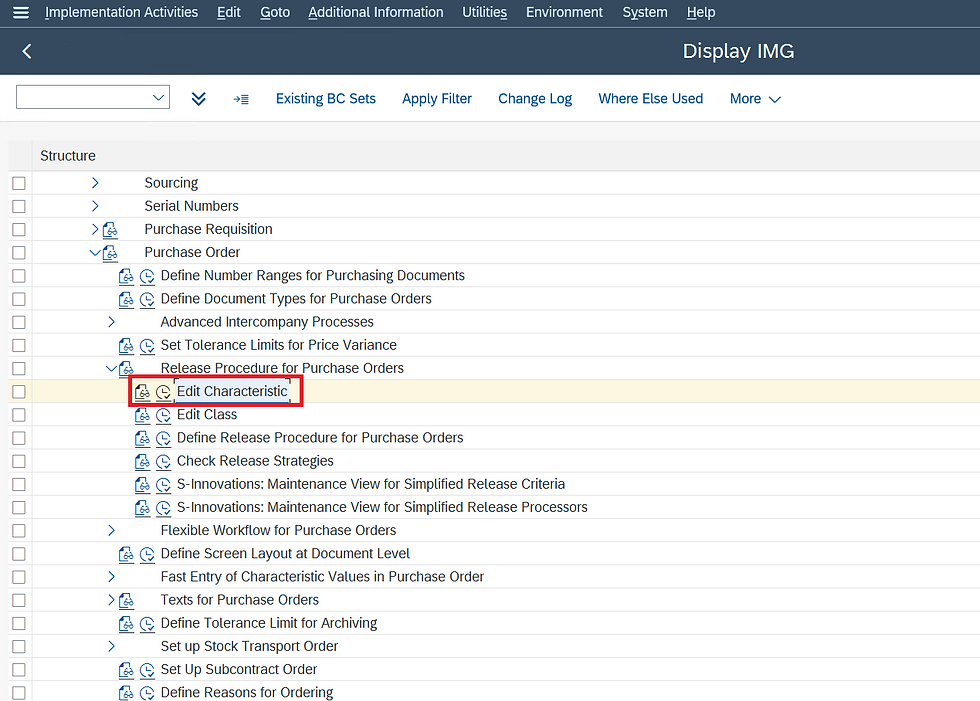
IMG ⇒ Materials Management ⇒ Purchasing ⇒ Purchase Order ⇒ Release Procedure for Purchase Order ⇒ Edit Characteristics
T Code: CT04
STEP 1: On the Display IMG screen, select Edit Characteristics, by following the above path.
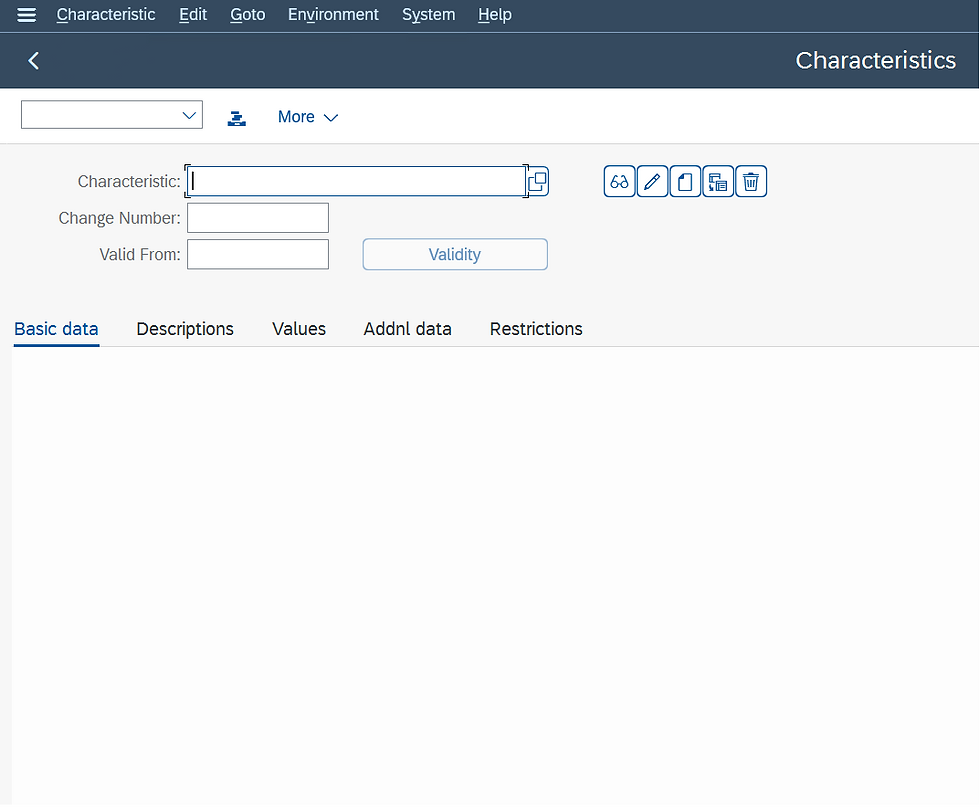
STEP 2: Enter the characteristics name.
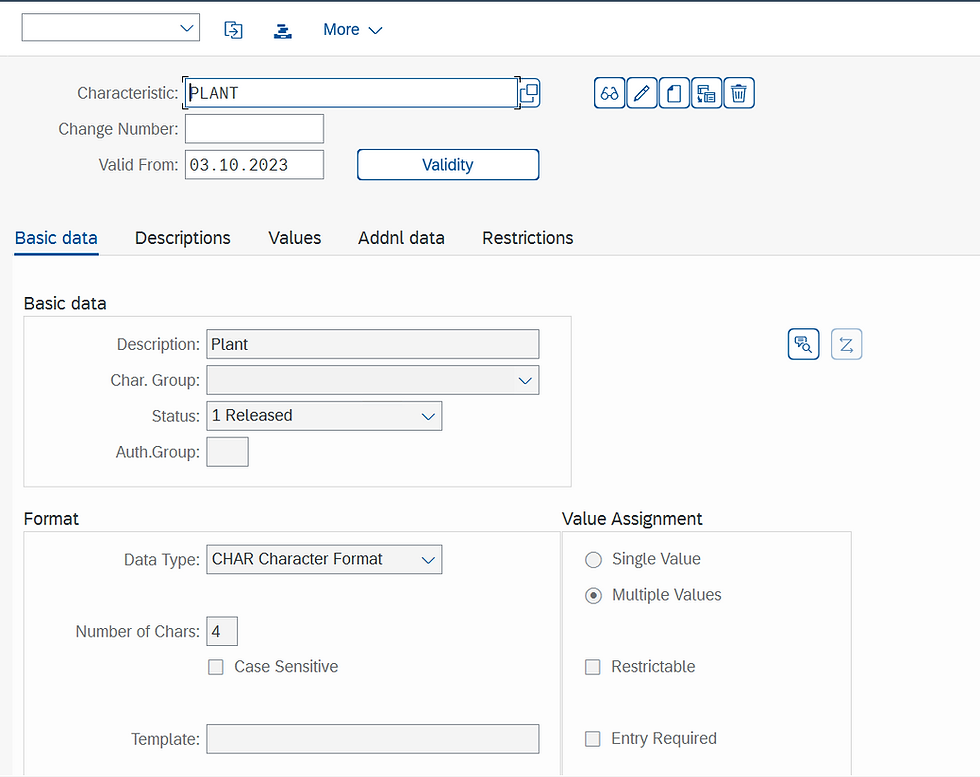
STEP 3: In basic data fill in fields like description, Data type, and Number of characters and select multiple values.
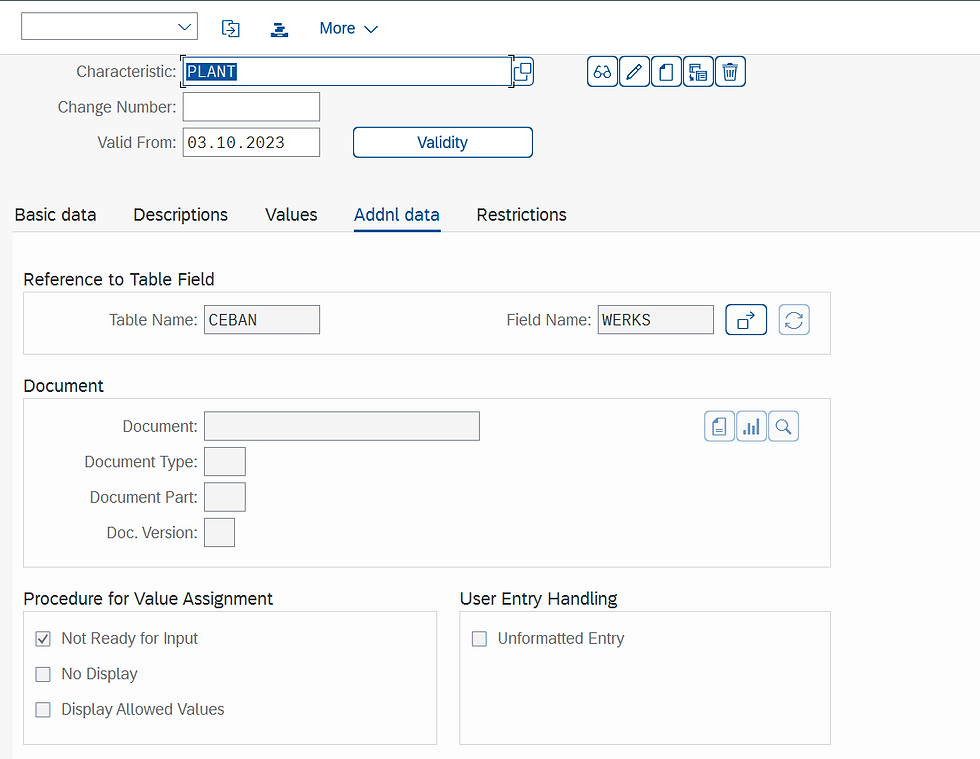
STEP 4: In additional data fill in table name and field name. For the table and field name, we can take reference of SE16N or SE16.
STEP 5: In restrictions fill in the class type as 032 which is release strategy and save.
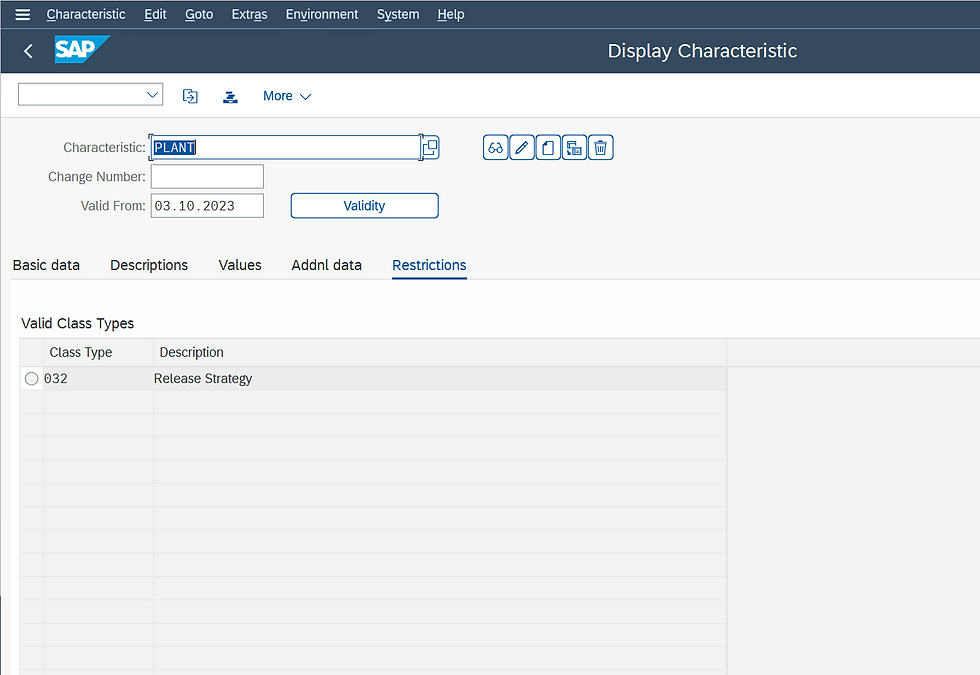
STEP 6: Create characteristics for Purchasing group, the Net value of the purchase order, and the Purchase Organization with reference of SE16N or SE16.
Edit Class
You use a class to group characteristics that are to constitute a release condition for a release strategy. In the " Define Release Procedure for Purchase Orders" step, you assign this class to the release strategy.
Path to Edit Class
IMG ⇒ Materials Management ⇒ Purchasing ⇒ Purchase Order ⇒ Release Procedure for Purchase Order ⇒ Edit Class
T Code: CL02
STEP 1: On the Display IMG screen, select Edit Class, by following the above path.
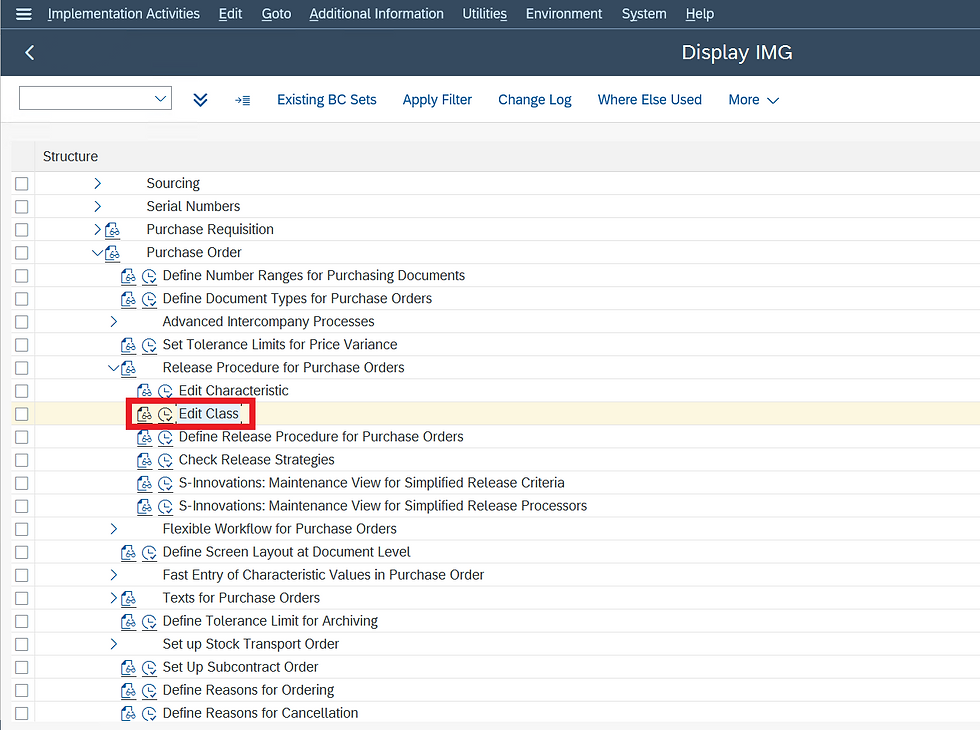
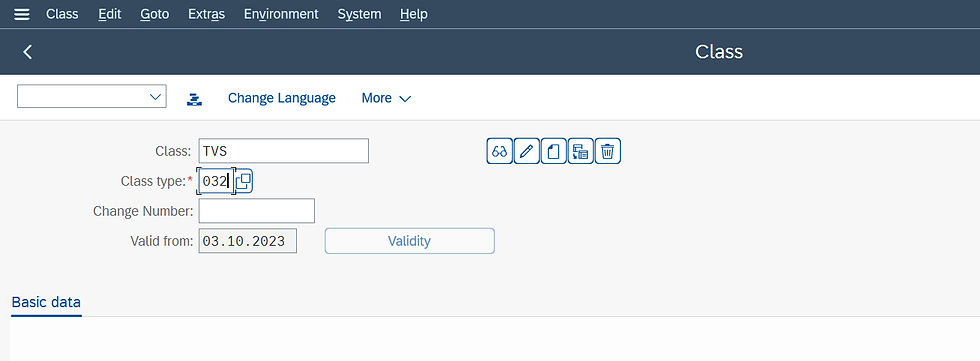
STEP 2: Enter the Class Name and class type as 032, the release strategy.
STEP 3: In basic data fill in the description.
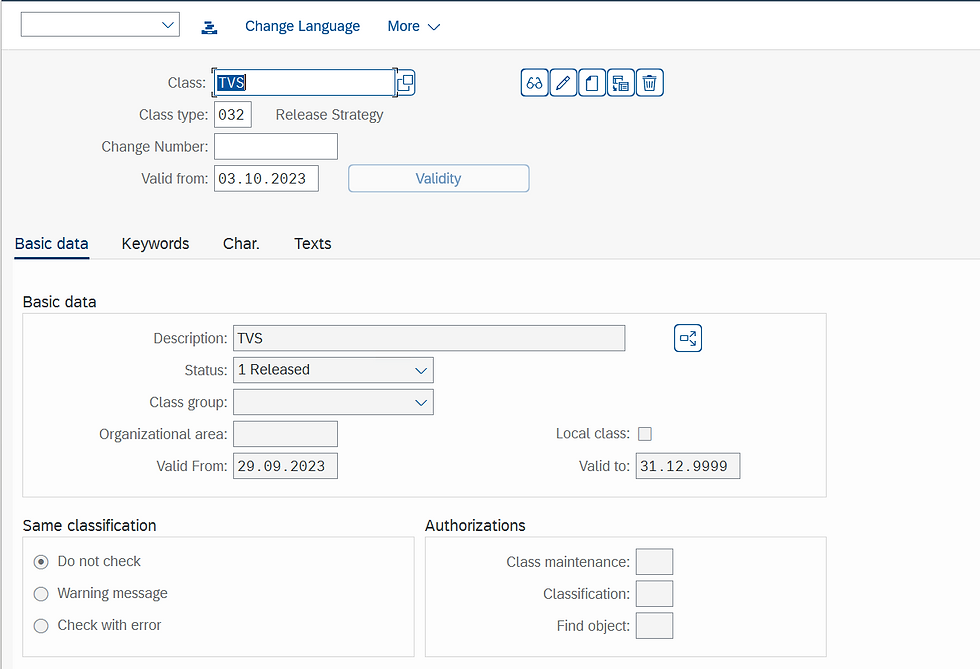
STEP 4: In characteristics fill all characteristics that we created in characteristics and save.
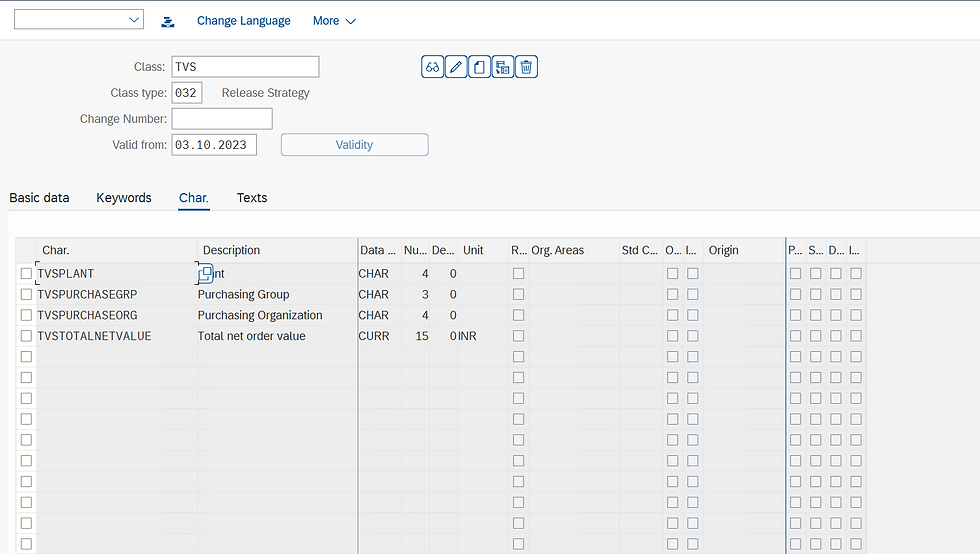
Define Release Procedure for Purchase Orders
In this step, you set up the release procedure for purchase orders (POs) and can link it to the workflow.
Path to Edit Class
IMG ⇒ Materials Management ⇒ Purchasing ⇒ Purchase Order ⇒ Release Procedure for Purchase Order ⇒ Define Release Procedure for Purchasing Order
STEP 1: On the Display IMG screen, select Define Release Procedure for Purchasing Order, by following the above path.
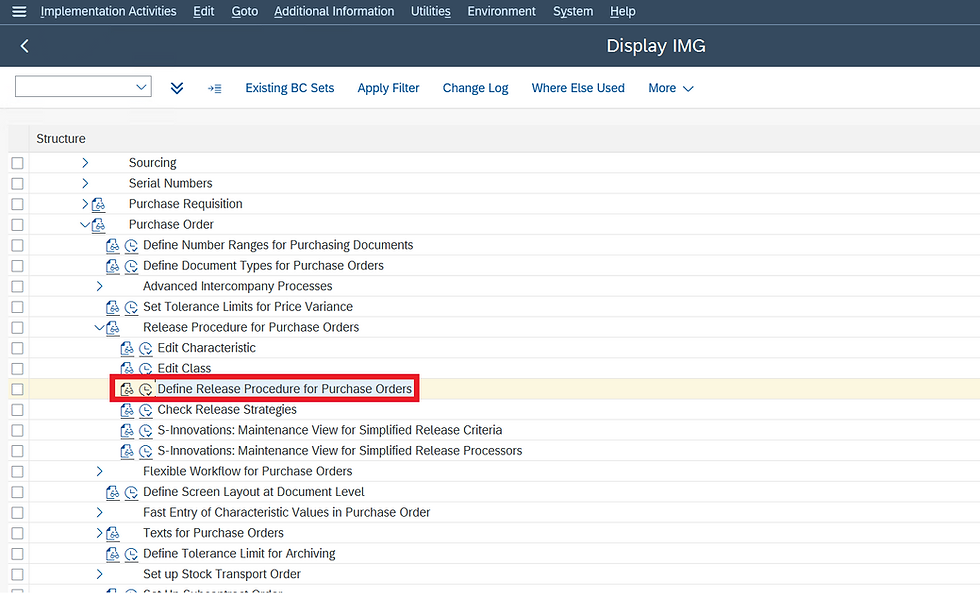
STEP 2: In Define Release Procedure for Purchasing Order, select Release Group.
Here we create a release group for the release procedure and assign it to a class. In the process, we assign release conditions to the release procedure.
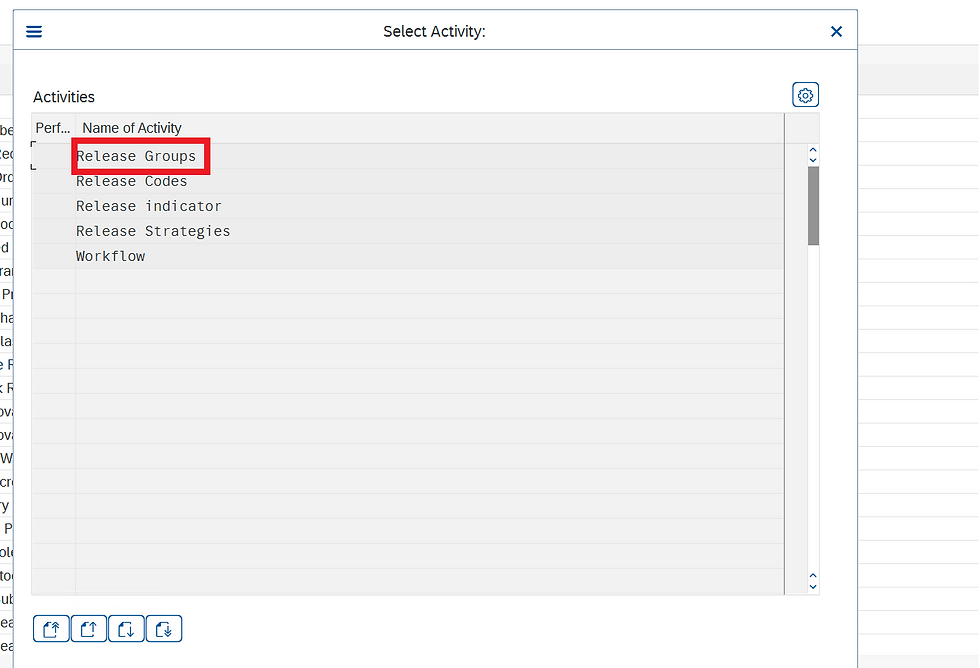
STEP 3: Click on new entries to create a Release Group.
Note: We can have only one release group in a system.
Fill in Release Group Name, Class, Description, and Save.

STEP 4: In Define Release Procedure for Purchasing Order, select Release codes.
Here we create the release codes you need for your release strategy and assign the codes to your release group. If a release code is to be used in workflow, indicate this accordingly in the Workflow field.
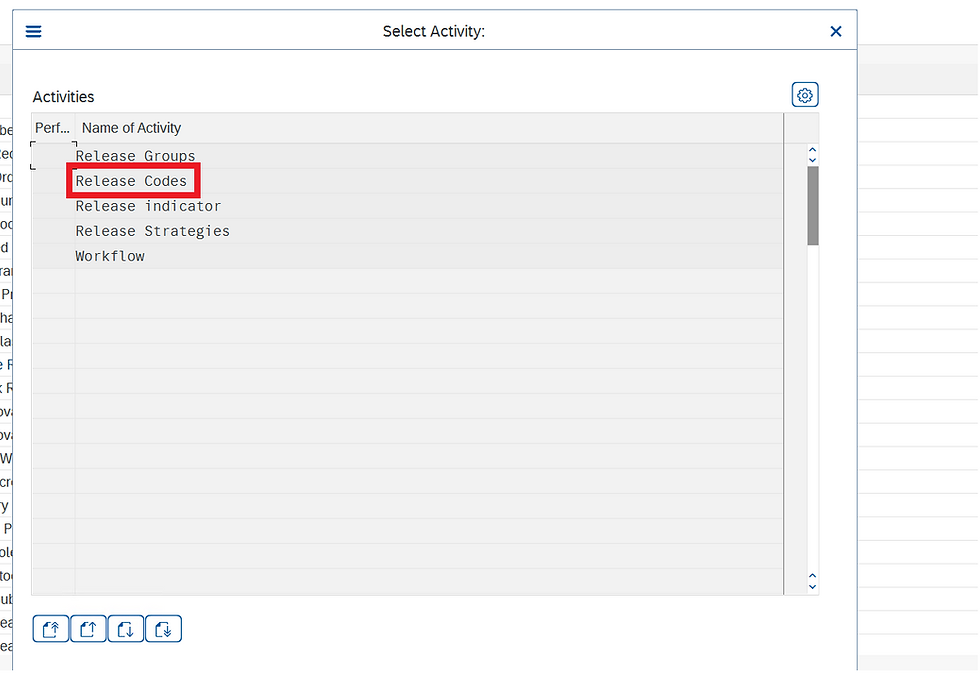
STEP 5: Click on the New Entries to create release codes.
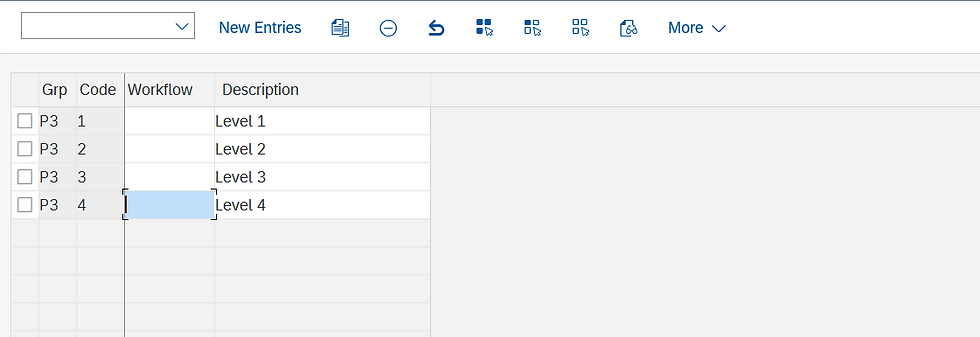
STEP 6: Fill in Fields like Release group, release codes, and save.

STEP 7: In Define Release Procedure for Purchasing Order, select Release Indicator.
A release indicator shows the release status of a PO.
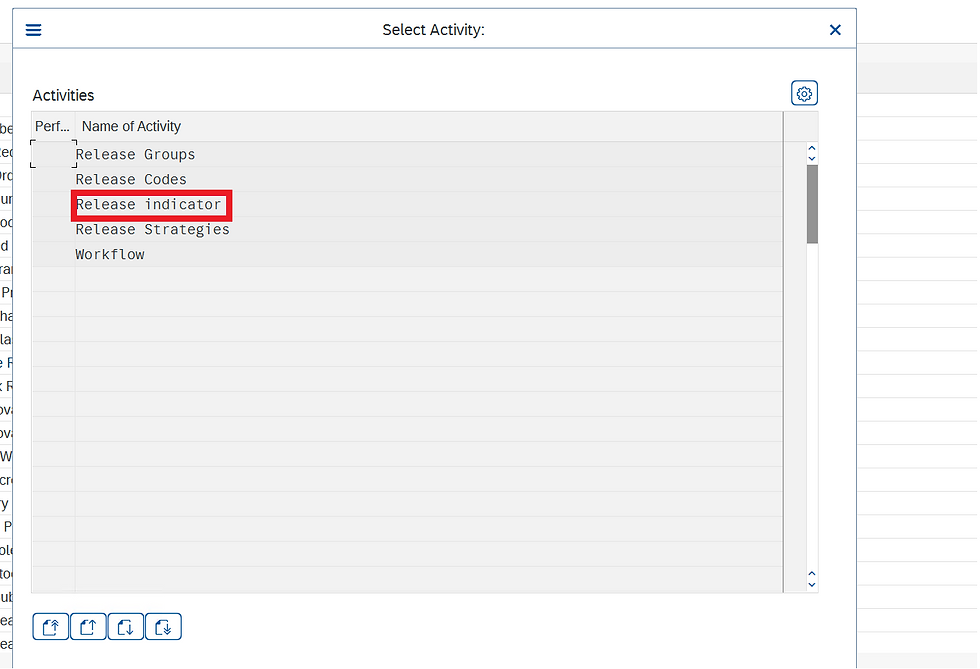
STEP 8: Click on New Entries to create a new release indicator.
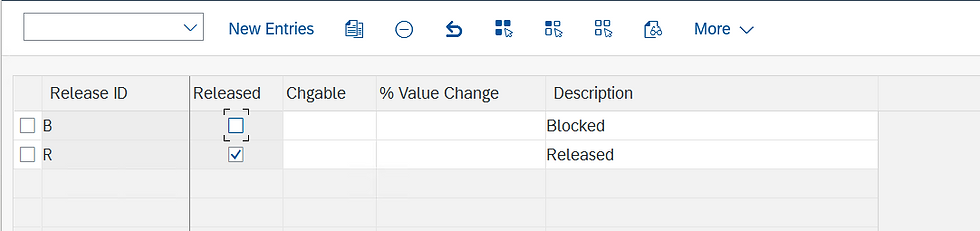
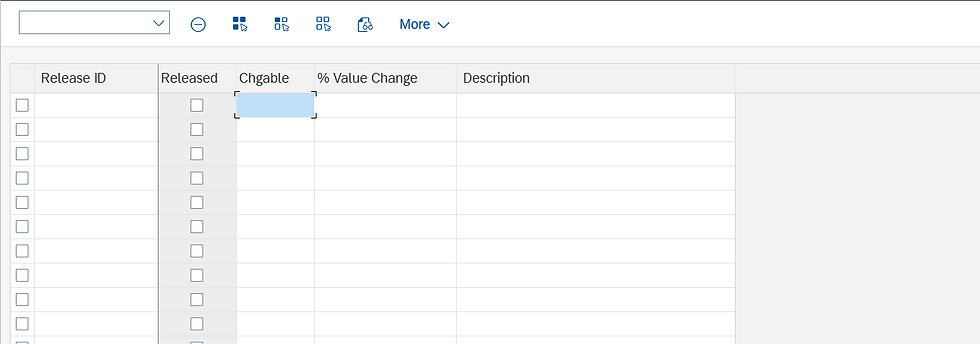
STEP 9: Fill in the release ID, Released status, changeable, and description, and save.
STEP 10: In Define Release Procedure for Purchasing Order, select Release Strategies.
Here we create a release strategy for your release group and assign your release codes accordingly.
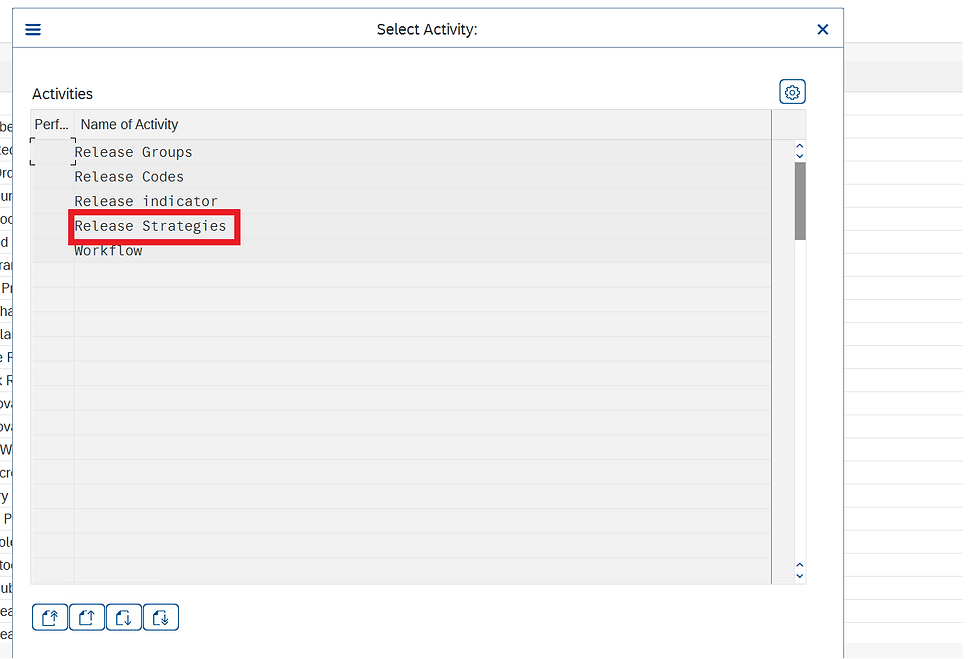
STEP 11: Click on the new entries to create a new release strategy.
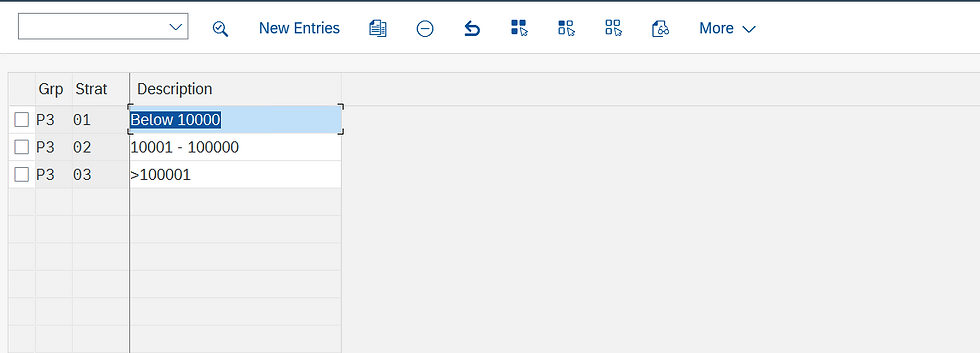
STEP 12: Fill in the Release group, Release Strategy name and description, and Release Codes.
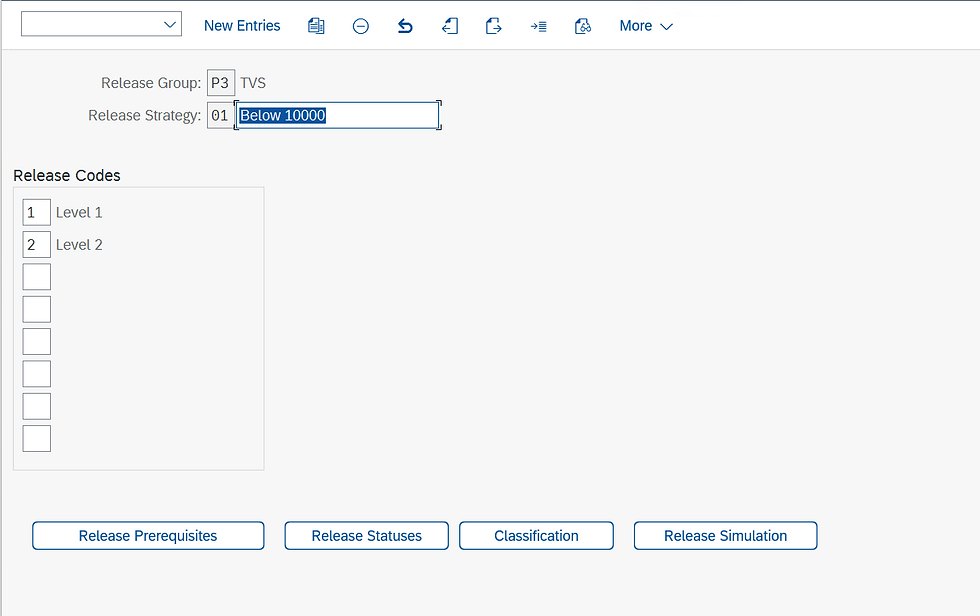
STEP 13: Click on the Release Prerequisite, select the release codes according to business requirements, and click on Continue.
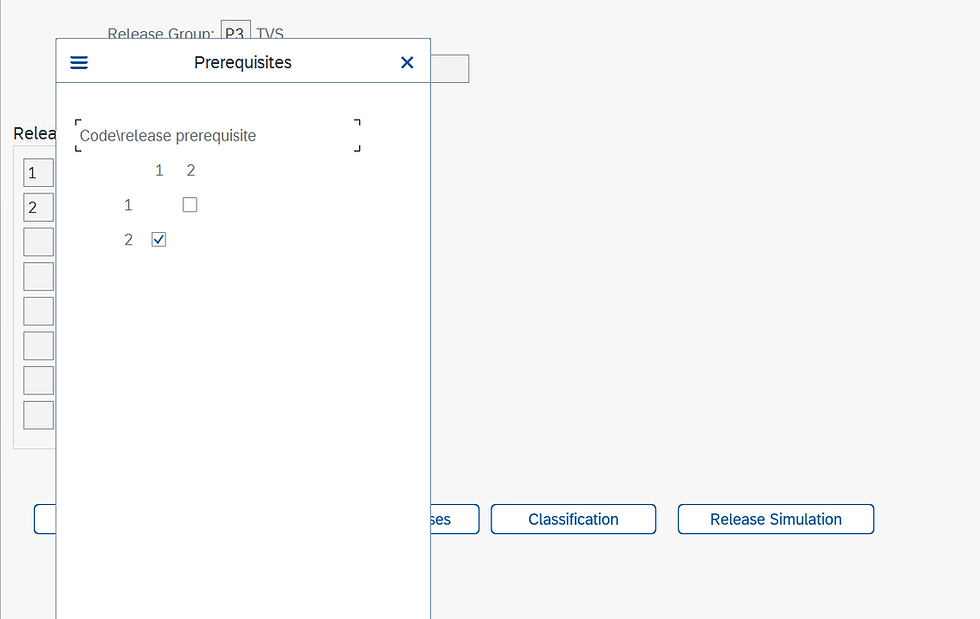
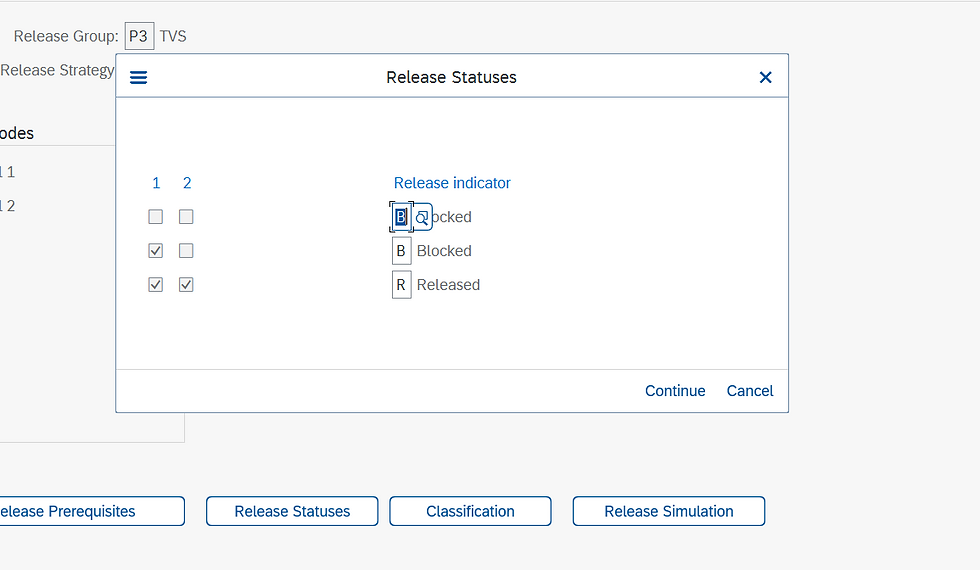
STEP 14: Click on Release Statuses, assign release codes with release indicators, and click on Continue.
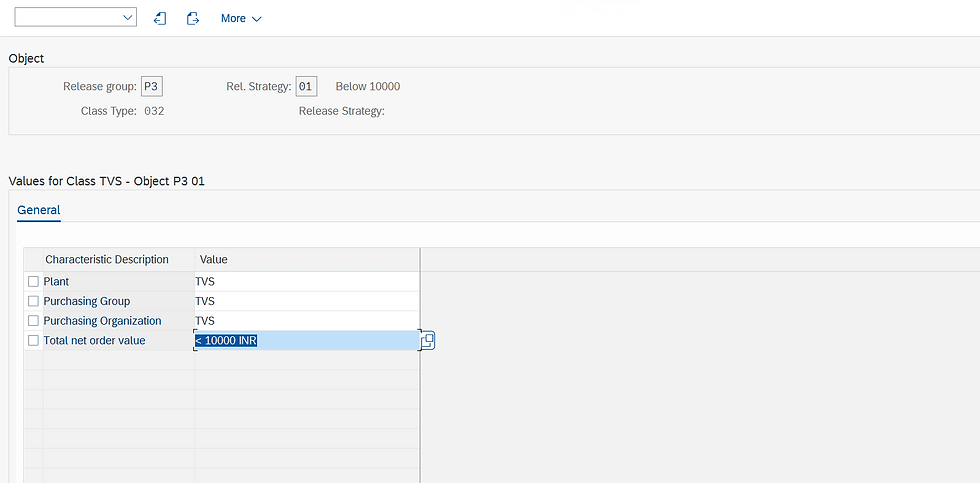
STEP 15: Click on classification, and fill in the values of all the characteristics.
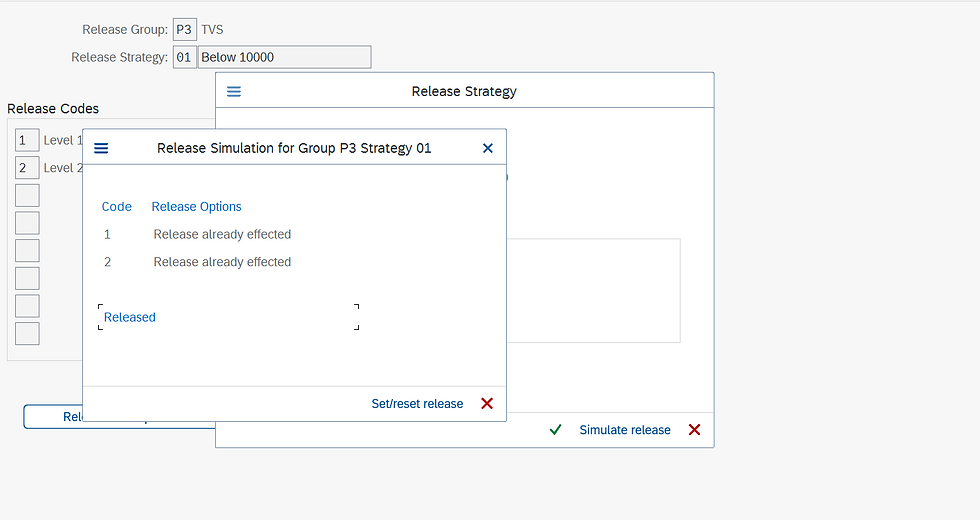
STEP 16: Click on Release Simulation, to Check strategy is working properly.

STEP 17: Click on simulate release for a simulation of the release strategy.
Click on save to save the release strategy.
Thank you for taking the read this blog
Upcoming SAP S/4 HANA Finance (FICO) online weekend batch
Enroll today: https://www.gauravconsulting.com/product-page/sap-s-4-hana-finance-beginners-live-training
For complete video package of FI, CO, SD, MM, FSCM, CFIN, Logistics & RAR visit the link
#SAPMM #SAPMMEnterpriseStructure #SAPMMArchitecture #EnterpriseStructure #SAPMMInsights #SAPMMEfficiency #SAPMMImplementation #SAPMMSuccess #SAPMMTips #SAPMMAutomation #SAPMMBestPractices #SAPMMEducational #SAPMMGuide #SAPMMExpertise #SAPMMTraining #SAPMMConsulting #SAPMMWorkflow #SAPMMSolutions #SAPMMBusinessProcesses #SAPMMConsultants


pkr spin interesting to see how different platforms continue introducing new features and interactive systems to keep users engaged. Innovation plays a big role in maintaining user interest and improving the overall experience.
A Release Strategy for Purchase Order in SAP MM is a predefined approval workflow that ensures every PO is reviewed before processing. It is based on conditions like value, plant, or material group and helps maintain control, compliance, and transparency in procurement.
Such structured approval systems are widely used in digital ecosystems as well, including platforms like apkstadium, where organized workflows enhance reliability and user trust.
This is a very clear and useful explanation of the release strategy in SAP MM. The way you’ve broken down the concept and included the configuration path and T-code makes it much easier for beginners to understand and follow. Release strategies can be confusing at first, so step-by-step guidance like this is really valuable.
I’ve been exploring more technical guides and resources like this recently. While doing so, I came across apkdera.com, which shares various apps and tools that can be helpful for learning and productivity—worth checking out for anyone interested in expanding their technical skills.
This is an interesting post about Mark Six and how these systems work. Many people are interested in understanding lottery trends and results, and y888 like this helps explain things in a simple way. It’s always important to stay informed and make decisions carefully when it comes to such activities.
This is a very helpful explanation of the release strategy for purchase orders in SAP MM. Proper configuration of approval levels is essential for maintaining control and transparency in procurement processes. It ensures that every purchase goes through the right checks before final approval, which can help organizations avoid errors and improve efficiency.
Understanding how release procedures work is especially important for businesses that manage large volumes of purchasing data. Articles like this make complex ERP concepts easier to understand for beginners and professionals alike.
While exploring different online platforms recently, I also came across this site:https://apkgraph.com/rs177-game/