


SAP SD - Sales Inquiry

In SAP SD, the Inquiry Process represents the very first interaction between a customer and an organization in the sales cycle. It helps businesses record customer interest without creating any financial or inventory impact.
What is an Inquiry in SAP SD?
An Inquiry is a sales document used to capture non-binding customer requests. It does not reserve stock, does not create accounting entries, and does not trigger delivery or billing.
It is mainly used for:
Price confirmation
Product availability check
Lead tracking before order confirmation
Where Inquiry fits in the SAP SD Sales Cycle
Typical SD (O2C) Sales Flow:
Inquiry
Quotation
Sales Order
Delivery
Billing
Inquiry is optional, but highly recommended in B2B sales and project-based scenarios.
Important Configuration related to Inquiry
Inquiry Document Type
Controls: Number range, Check Credit Limit, Sales Document Block, etc.

Follow below path for Configuring:

To Setup Sales Area

Assignment of Sales Area to Sales Office (Optional)

Assignment of Sales Office to Sales Group (Optional)

Follow the below link to configure Partner Functions for Customer

Go to T-Code OVKK to Set Pricing Procedure Determination
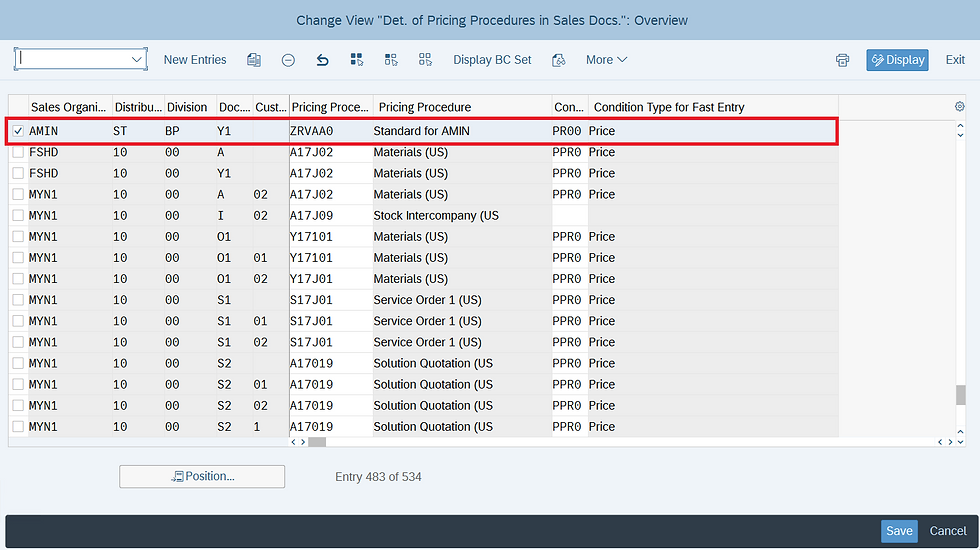
Steps to create an Inquiry Document in SAP SD
STEP 1: Go to T-Code VA11 then provide the Inquiry Type and Organizational Data

STEP 2: Provide the Sold-to-Party, Ship-to-Party, Customer Reference in Header Item and Material, Quantity, Amount in the line Item.

Display Inquiry Document with T-Code VA13

Conclusion
The Inquiry Process in SAP SD acts as a foundation for the sales lifecycle. While it has no direct financial or logistical impact, it plays a critical role in professional sales management, especially in industries where pricing and delivery are negotiated before order confirmation.
For SAP SD consultants, understanding inquiry processing helps in better requirement gathering, clean sales document flow, and effective client communication.


Trong lúc xem một vài nội dung về các website giải trí trực tuyến, mình tình cờ thấy rikvip được nhắc đến nên cũng tò mò truy cập thử. Do trước đó chưa tìm hiểu nhiều về trang này, mình chủ yếu lướt qua giao diện, xem cách các chuyên mục như game bài, xóc đĩa, tài xỉu được sắp xếp ra sao. Tổng thể trang không quá cầu kỳ, các khu vực được chia khá rõ nên nhìn nhanh vẫn dễ hình dung. Mình thử chuyển qua một vài mục khác nhau, thao tác tương đối nhẹ và thời gian phản hồi cũng khá ổn. Với một lần ghé xem nhanh như vậy thì mình thấy cách trình bày của…
GK88 được mình bắt gặp khá ngẫu nhiên lúc đang rà lại một danh sách liên kết trong tài liệu đã lưu. Có một đường dẫn mang tên này nằm ở phần tham khảo nên mình mở sang tab mới để xem thử nội dung phía sau. Mình chỉ kiểm tra nhanh rồi chuyển qua việc khác, nhưng khá chú ý đến cách bố trí trang. Các mục chính được đặt tương đối rõ, phần chữ không dồn thành từng mảng lớn nên đọc lướt vẫn nắm được cấu trúc. Mình bấm thử vài khu vực rồi quay lại trang đầu, thao tác khá trực quan.
Hôm qua đọc được bài thảo luận thấy có nhắc đến Bet88, tò mò nên mình ghé ngang ngó thử thiết kế. Mình chưa rảnh để test sâu, nhưng thấy trang chia bố cục hợp lý phết. Phân khu thể thao nằm riêng, không đè lên không gian của live casino. Kho trò chơi slot thì chia ngăn nắp theo các sảnh game. Việc điều hướng trên web rất trực quan, dễ bấm, không bị dồn ứ nội dung.
Tình cờ thấy website 8xbet được nhắc đến khi đang đọc vài chia sẻ trên mạng nên mình mở vào xem thử. Chủ yếu mình lướt xem cách họ phân chia giao diện chứ không khám phá sâu. Ấn tượng đầu là trang có bố cục hợp lý, tách bạch mảng thể thao với phòng live casino. Các trò chơi slot cũng gom theo từng sảnh game nên nhìn tổng thể dễ theo dõi, không bị dồn cục nội dung. Di chuyển giữa các mục khá mượt.
Some articles compel me to slow down because the subject matter is rather sensitive, and content regarding the grief of losing a pet is one such instance. Previously, I had encountered the topic S8 of reward-based card games—often associated with leisure and passing the time. Placing these two subjects side by side, I realize that each situation calls for a distinct approach. The section discussing how to cherish memories and allow oneself to grieve is written with great restraint, avoiding the trap of offering hollow words of encouragement.