


SAP SD - Partner Functions

Updated: Jan 23
What are Partner Functions in SAP ?
Partner Functions are roles that business partners (such as customers, vendors, or other entities) can play in a business transaction. These roles are used to define the responsibilities and relationships of these partners in different business processes, such as sales orders, purchase orders, or deliveries.
Here are some standard partner functions provided in SAP:
Sold-to Party (SP) : The customer who places the order.
Ship-to Party (SH) : The location where the goods are to be delivered.
Bill-to Party (BP) : The entity responsible for receiving the invoice.
Payer (PY) : The entity responsible for making the payment.
How to maintain Partner Functions in SAP ?
PATH TO CONFIGURE : Display IMG-> Sales and Distribution > Basic Functions > Partner Determination > Set Up Partner Determination > Set Up Partner Determination for Customer Master / T.Code VOPAN

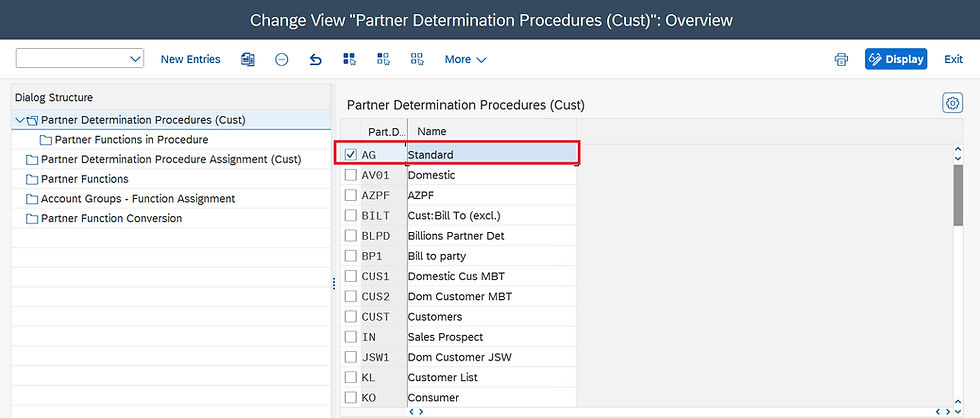
Partner Determination Procedure (Customer)
Partner determination is the process by which SAP automatically assigns partner functions to a business transaction based on predefined rules. This setup ensures that the correct partners are involved in each transaction, and it can be configured to meet the specific needs of a business.
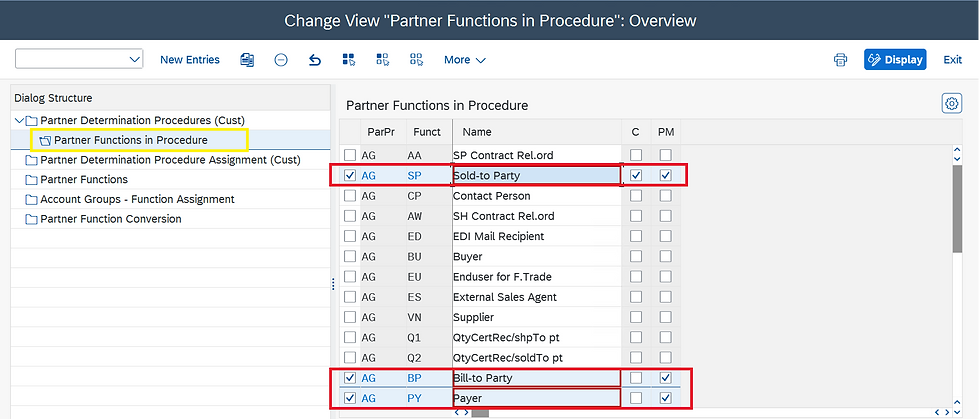
Partner Function in Procedure
Here, we can see all the Partner Functions available in the Partner Determination Procedure and also for which Partner Function is "Mandatory" and which Partner "cannot be changed" are controlled from this screen.
Partner Determination Procedure Assignment (Customer)
The procedure specifies which partner functions are allowed for a particular business transaction (for example, for processing a sales order) and which of those partner functions are mandatory.

Custom Partner Functions
In addition to standard partner functions, businesses can define custom partner functions to address specific requirements. These can be configured in the SAP system through customization settings. To define new Partner function, enter -
New Partner Function - 2 digit code
Partner Type - for example, whether the partner is a customer(KU), supplier (LI), etc.
Error Group Procedure - The number that uniquely identifies the incompleteness procedure. This defines number of fields in which the user must enter information.
Unique in the Master data - Indicates whether you can use this partner function only once in the customer master data.

Account Group to Function Assignment
This assignment ensures that the correct partner functions are used for the appropriate account groups during transaction processing.

Partner Function in Customer Master Data

By leveraging the partner functions and partner determination procedures in SAP SD, businesses can streamline their sales and distribution processes, ensure accurate partner role assignments, and ultimately achieve greater operational efficiency and customer satisfaction.
Thank you for taking the time to read my blog. I appreciate your support and hope you found this content valuable. Stay tuned for my upcoming blog posts.
To Join our SAP Sales & Distribution (SD) Course:
#SAP #SAPSD #salesandistribution #sappartnerfunction #shiptoparty #soldtoparty #billtoparty #payer #sapcommunity #sapconsultant #sapfico #buinesspartner #flcu001 #sales #sapblog



After spending some time exploring Yaar Win Game , I would describe my experience as good overall. The registration and login process were straightforward, and I found the interface fairly easy to navigate. The platform has a decent mobile experience and doesn't take too long to understand. I did experience some minor loading problems, but they weren't constant. My review is based on usability, and anyone considering real-money gaming should carefully consider the associated risks.
Socolive tối qua lúc ngồi chờ đồ ăn, mình mở lên lướt vài phút cho đỡ chán thôi. Nhìn phát đầu tiên là thấy trang chia thành từng khối rõ ràng, kéo xuống không bị kiểu “trôi” lạc đề, nên não mình đỡ phải làm việc thêm. Chữ và khoảng cách dòng nhìn khá dễ chịu, đọc một lúc không bị nhức mắt như mấy trang hay nhồi chữ. Mình để ý cái menu đặt ở vị trí dễ thấy, bấm qua lại vài lần thì phản hồi nhanh, không phải đứng hình kiểu đợi mạng cứu. Màu nền với icon dùng vừa đủ để nhận diện, không bị sặc sỡ làm mình mất tập trung. Nói chung lướt nhẹ…
Socolive thì ừ, đang đọc comment của bạn mình mới nhớ ra là lần trước mình có lướt qua có vài phút thôi, kiểu mở lên xem thử rồi đóng, mà cái cách họ bày bố theo từng khối rõ ràng nên mắt tự tìm được chỗ cần nhìn, kéo xuống cũng không phải đoán “đoạn này thuộc mục nào”, nhìn khá đỡ mệt. Menu để ngay chỗ dễ thấy. Bấm chuyển qua lại cũng nhanh, không phải chờ load lâu. Mà tông chữ với màu nền nhìn vừa vừa, không làm mình phải nheo mắt. Nói chung mình dùng kiểu xem lướt vẫn thấy ổn. Cái mình thích nhất là mấy khung nội dung dạng block xếp ngay ngắn,…
SC88 mình lướt thử thấy kiểu bố cục nó giống mấy trang giải trí mình hay vào trước đây, nhưng nhìn “sạch” và sáng hơn nên đọc lâu không bị mỏi mắt; mình chỉ định xem qua cho biết thôi mà lại ngồi nghịch menu một lúc vì các mục đặt khá ngay ngắn, bấm qua lại trên điện thoại cũng đáp ứng nhanh, ít kiểu giật lag. Có một điểm mình thích là phần bài viết mới để khá lộ, tiêu đề nổi bật nên muốn đọc thông tin tổng quan thì chạm cái là ra, khỏi phải kéo tìm mãi. Nút bấm vừa ngón tay. Với lại khu vực tài khoản và hỗ trợ họ tách thành các…
Tài xỉu Fyi mình cũng tò mò nên bấm vào thử xem sao, ai ngờ vừa load lên đã đập vào mắt cái trang báo lỗi “404 Not Found” luôn. Cảm giác hơi hài vì khỏi cần tìm gì thêm, nhưng ít ra thông báo nhìn gọn gàng, chữ rõ ràng, đọc cái là hiểu ngay là tài nguyên không có trên server. Mình thích kiểu trang lỗi không màu mè, không nhồi pop-up hay mấy thứ rối mắt, nên dù bị chặn ngay từ đầu vẫn thấy ổn. Kéo xuống dưới còn thấy dòng “Proudly powered by LiteSpeed Web Server” nằm ngay trên trang 404 Not Found.