


Release Strategy for Purchase Order in SAP MM

Updated: Mar 31
The Release Strategy for Purchase Order in SAP MM defines the approval process for purchase requisitions or external purchasing documents. The strategy specifies the release codes necessary and the sequence in which releases have to be affected. You can define a maximum of eight release codes.
Steps to configure Release Strategy for Purchase Order in SAP MM
1. Edit Characteristic
Classification characteristics are the criteria for a release condition. If the criteria of a release condition are satisfied, the associated release strategy is assigned to the purchasing document.
Path to Edit Characteristics
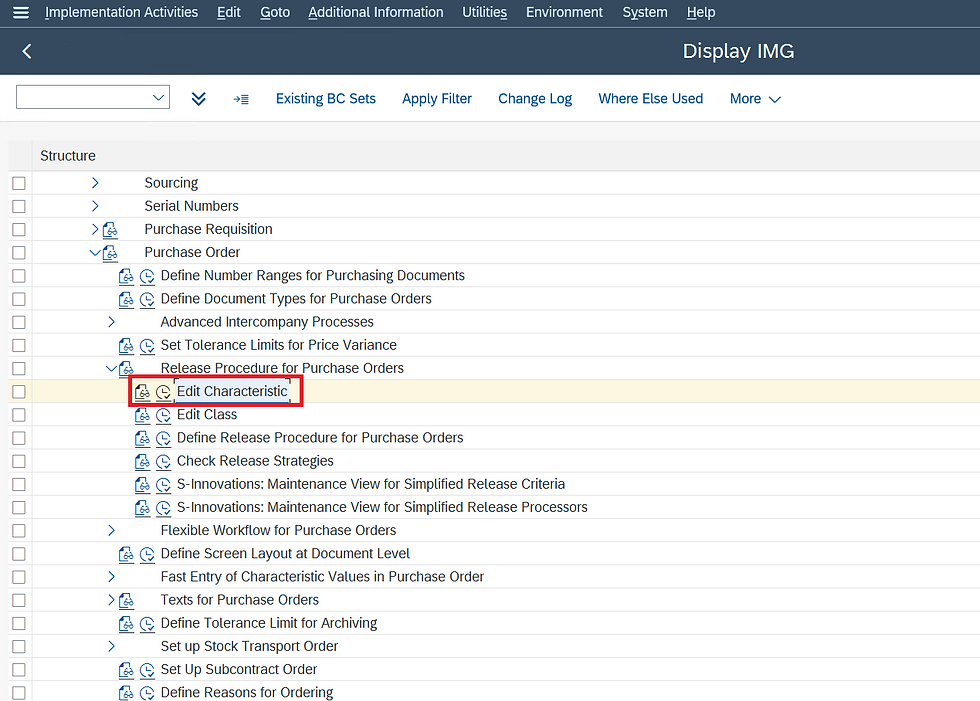
IMG ⇒ Materials Management ⇒ Purchasing ⇒ Purchase Order ⇒ Release Procedure for Purchase Order ⇒ Edit Characteristics
T Code: CT04
STEP 1: On the Display IMG screen, select Edit Characteristics, by following the above path.
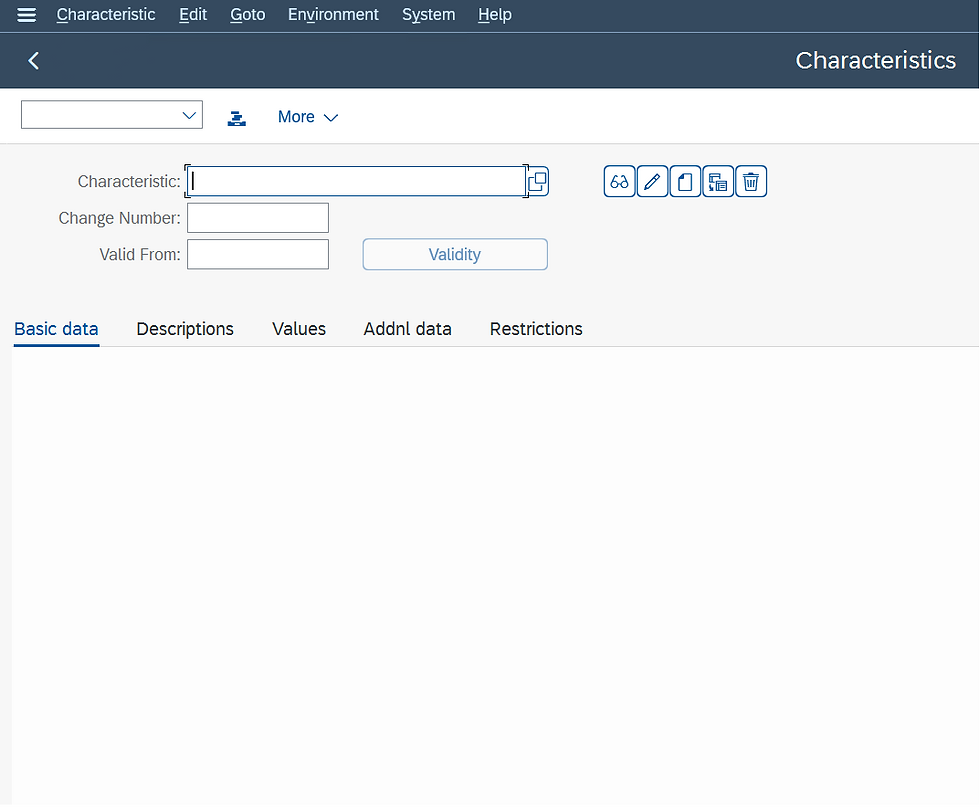
STEP 2: Enter the characteristics name.
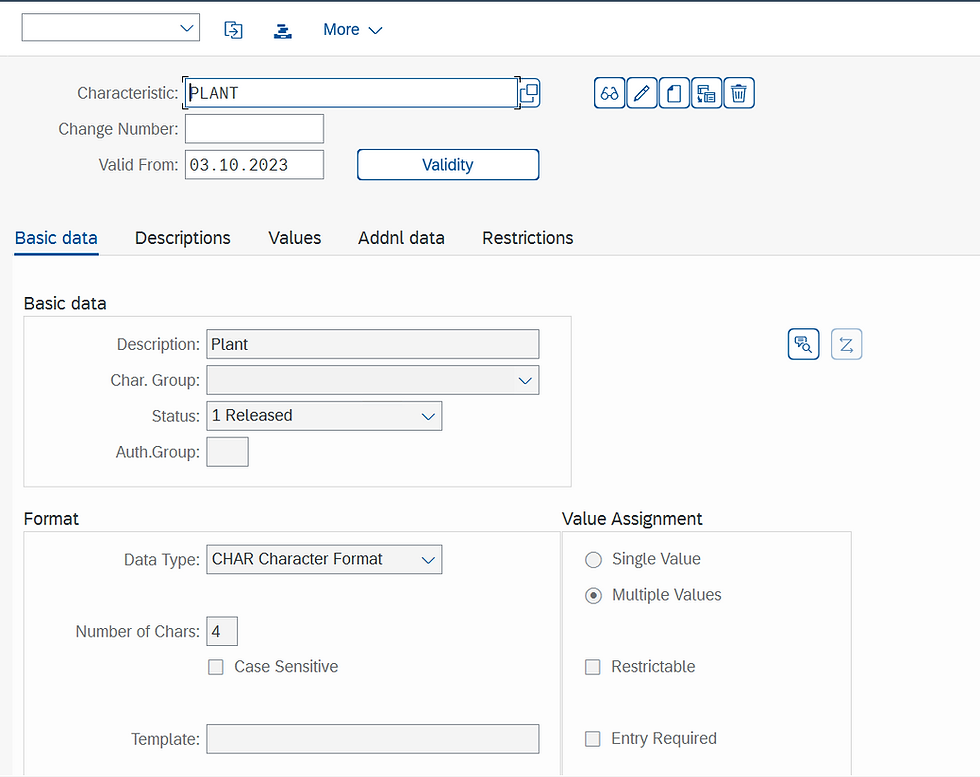
STEP 3: In basic data fill in fields like description, Data type, and Number of characters and select multiple values.
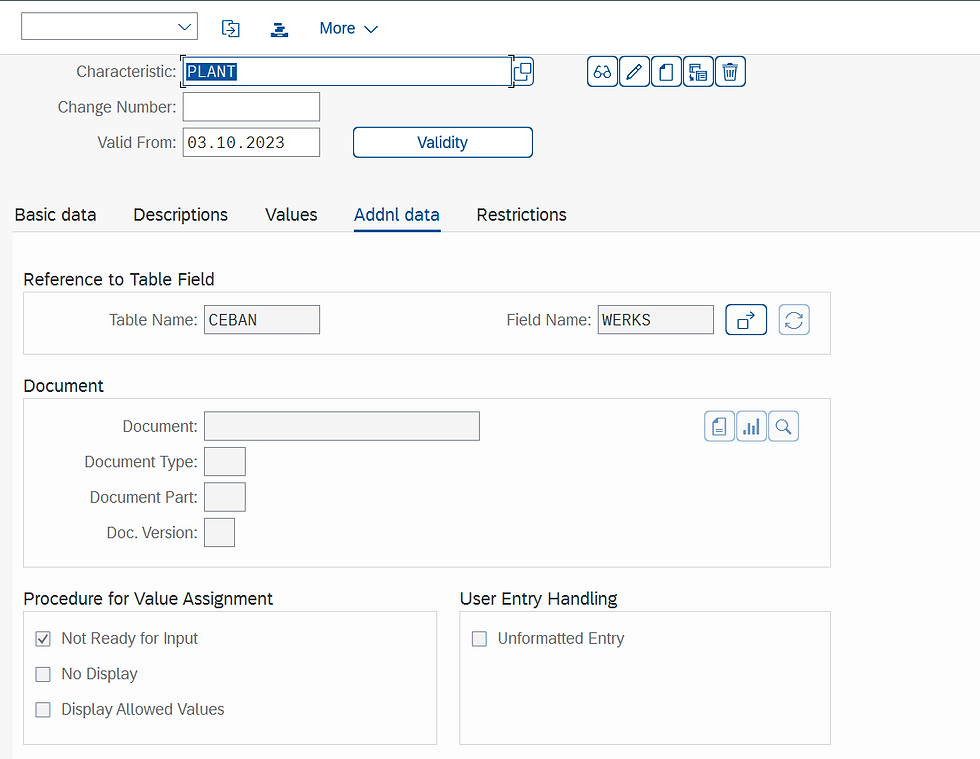
STEP 4: In additional data fill in table name and field name. For the table and field name, we can take reference of SE16N or SE16.
STEP 5: In restrictions fill in the class type as 032 which is release strategy and save.
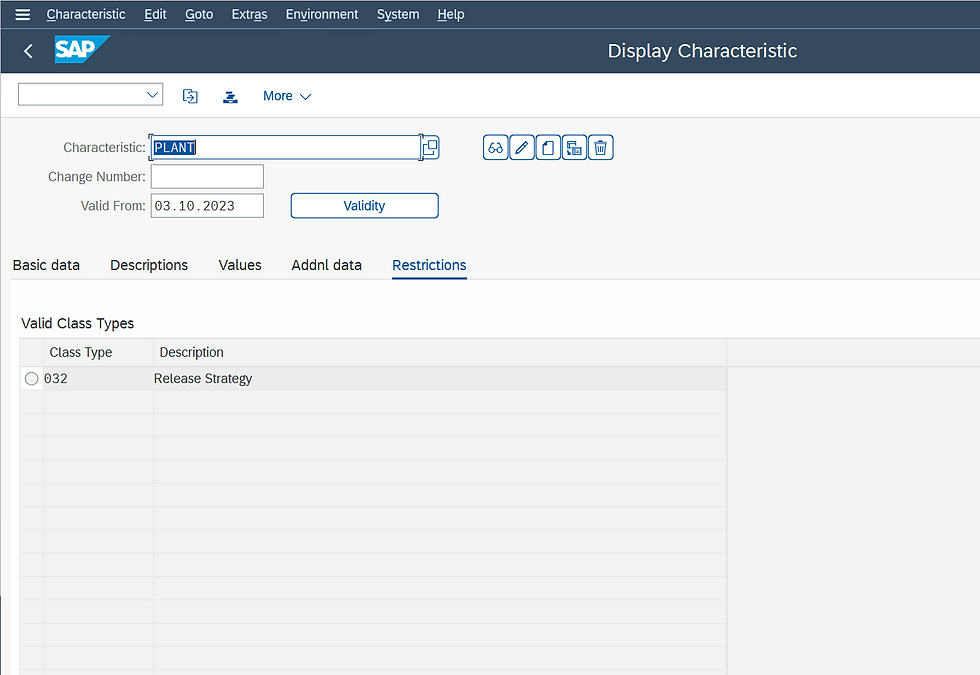
STEP 6: Create characteristics for Purchasing group, the Net value of the purchase order, and the Purchase Organization with reference of SE16N or SE16.
Edit Class
You use a class to group characteristics that are to constitute a release condition for a release strategy. In the " Define Release Procedure for Purchase Orders" step, you assign this class to the release strategy.
Path to Edit Class
IMG ⇒ Materials Management ⇒ Purchasing ⇒ Purchase Order ⇒ Release Procedure for Purchase Order ⇒ Edit Class
T Code: CL02
STEP 1: On the Display IMG screen, select Edit Class, by following the above path.
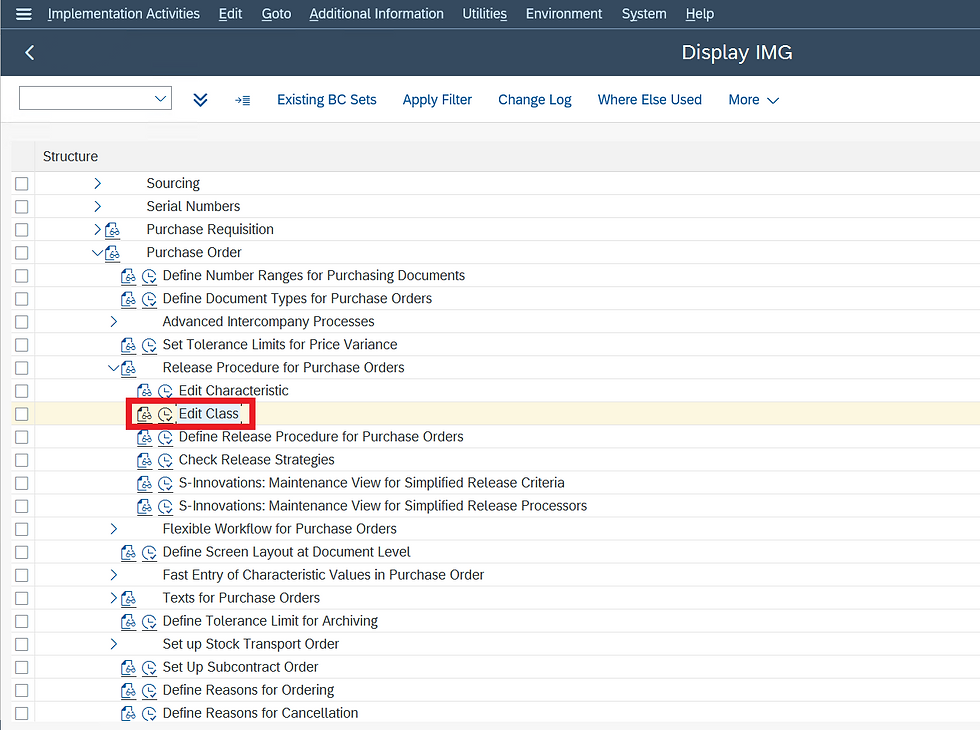
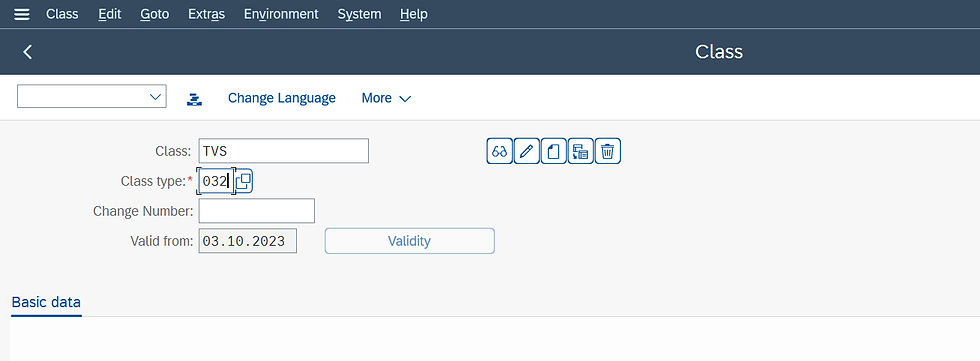
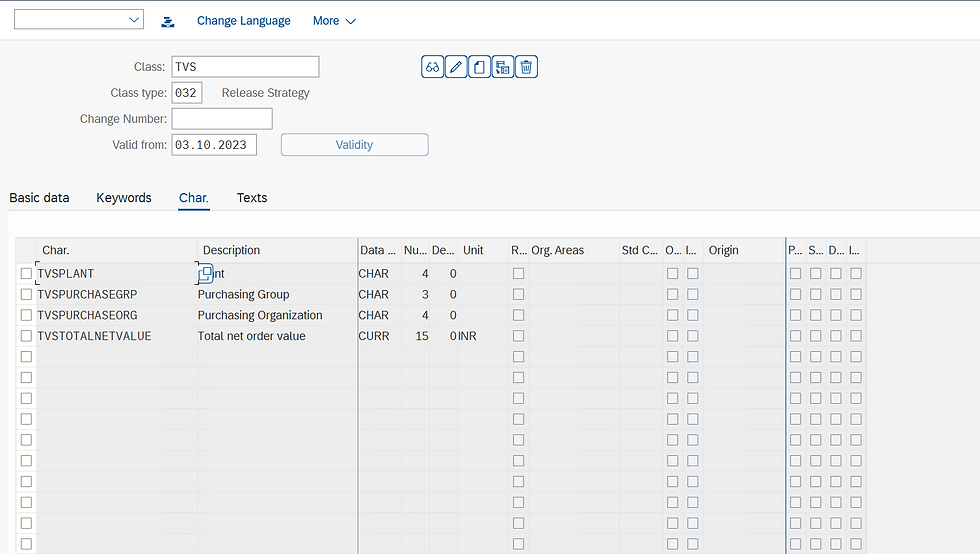
STEP 2: Enter the Class Name and class type as 032, the release strategy.
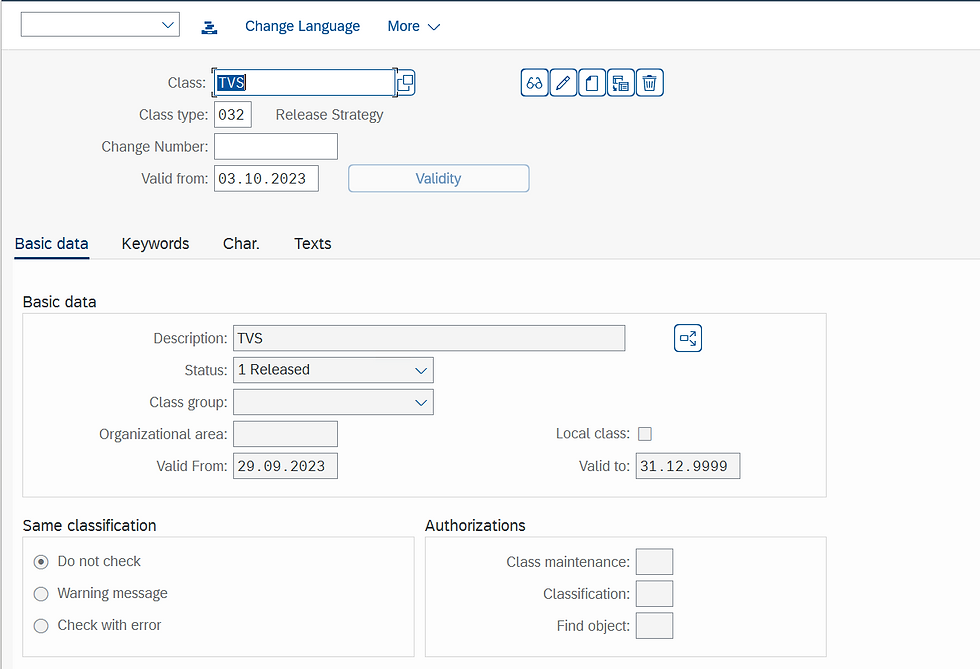
STEP 3: In basic data fill in the description.
STEP 4: In characteristics fill all characteristics that we created in characteristics and save.
Define Release Procedure for Purchase Orders
In this step, you set up the release procedure for purchase orders (POs) and can link it to the workflow.
Path to Edit Class
IMG ⇒ Materials Management ⇒ Purchasing ⇒ Purchase Order ⇒ Release Procedure for Purchase Order ⇒ Define Release Procedure for Purchasing Order
STEP 1: On the Display IMG screen, select Define Release Procedure for Purchasing Order, by following the above path.
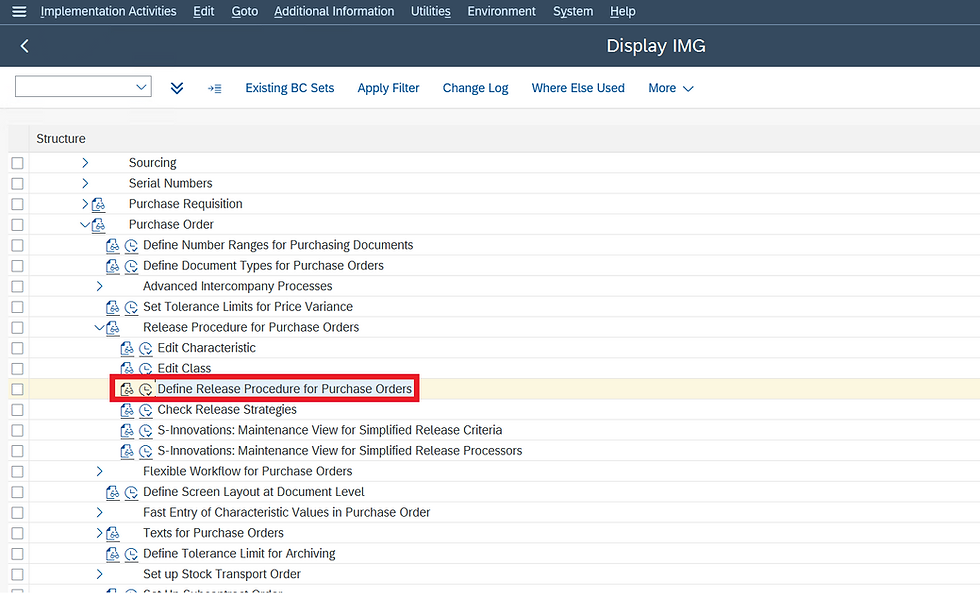
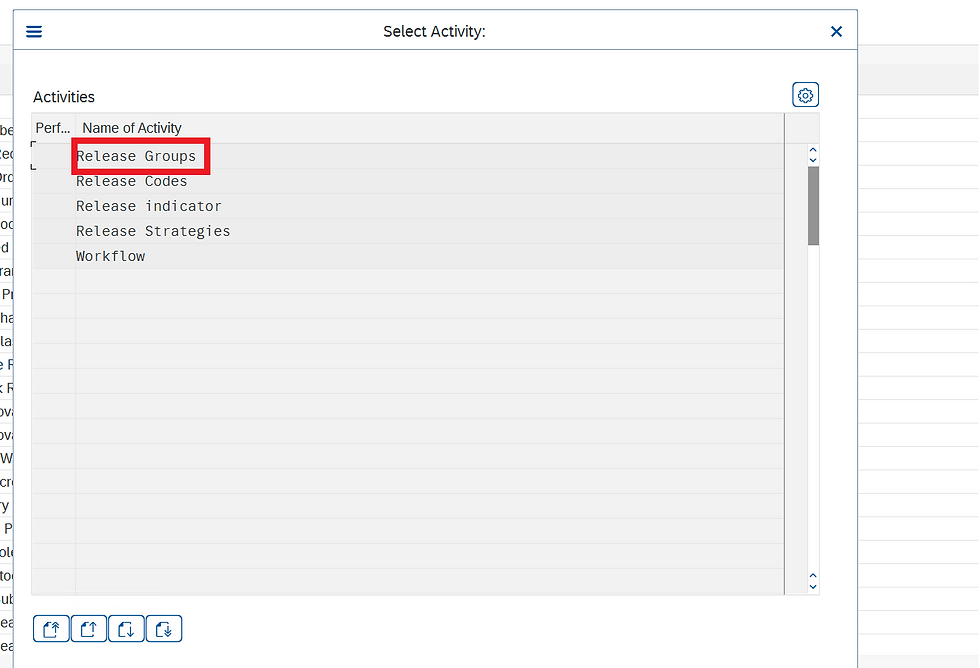
STEP 2: In Define Release Procedure for Purchasing Order, select Release Group.
Here we create a release group for the release procedure and assign it to a class. In the process, we assign release conditions to the release procedure.
STEP 3: Click on new entries to create a Release Group.
Note: We can have only one release group in a system.
Fill in Release Group Name, Class, Description, and Save.

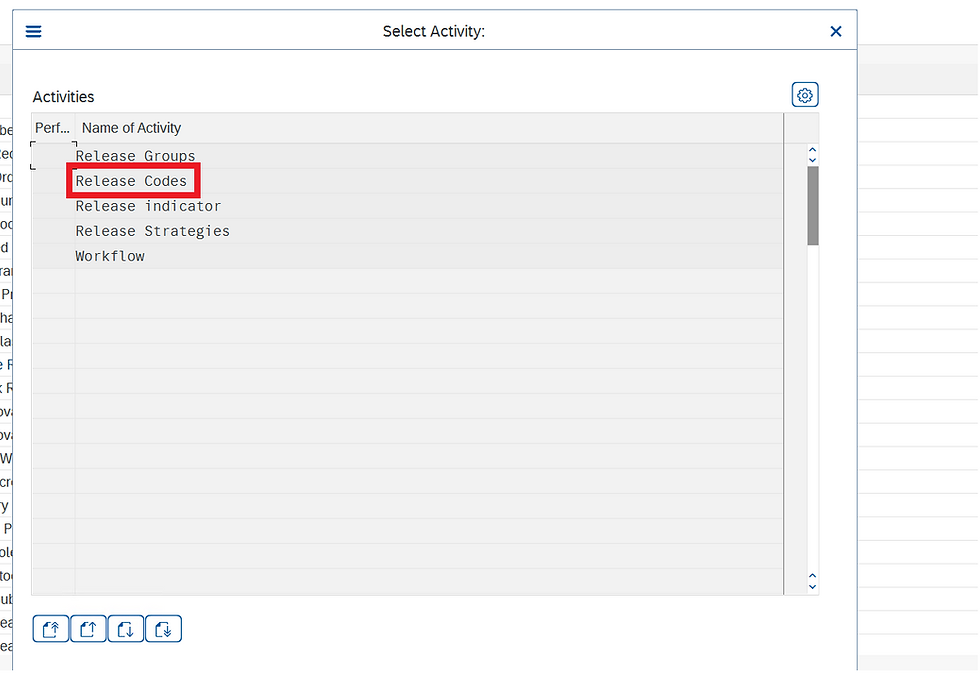
STEP 4: In Define Release Procedure for Purchasing Order, select Release codes.
Here we create the release codes you need for your release strategy and assign the codes to your release group. If a release code is to be used in workflow, indicate this accordingly in the Workflow field.
STEP 5: Click on the New Entries to create release codes.
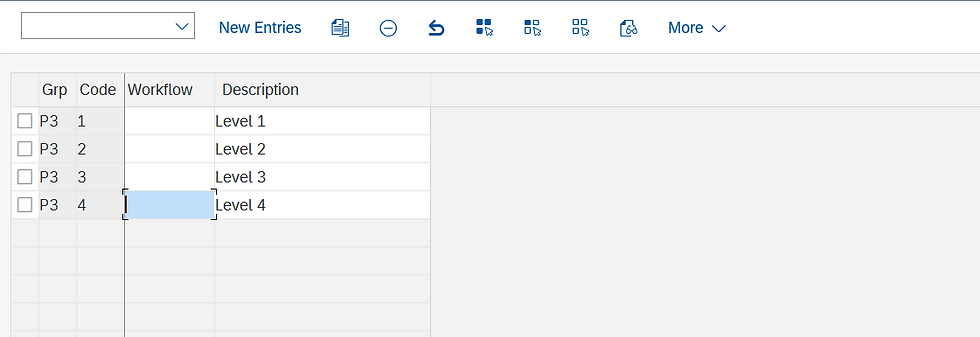
STEP 6: Fill in Fields like Release group, release codes, and save.

STEP 7: In Define Release Procedure for Purchasing Order, select Release Indicator.
A release indicator shows the release status of a PO.
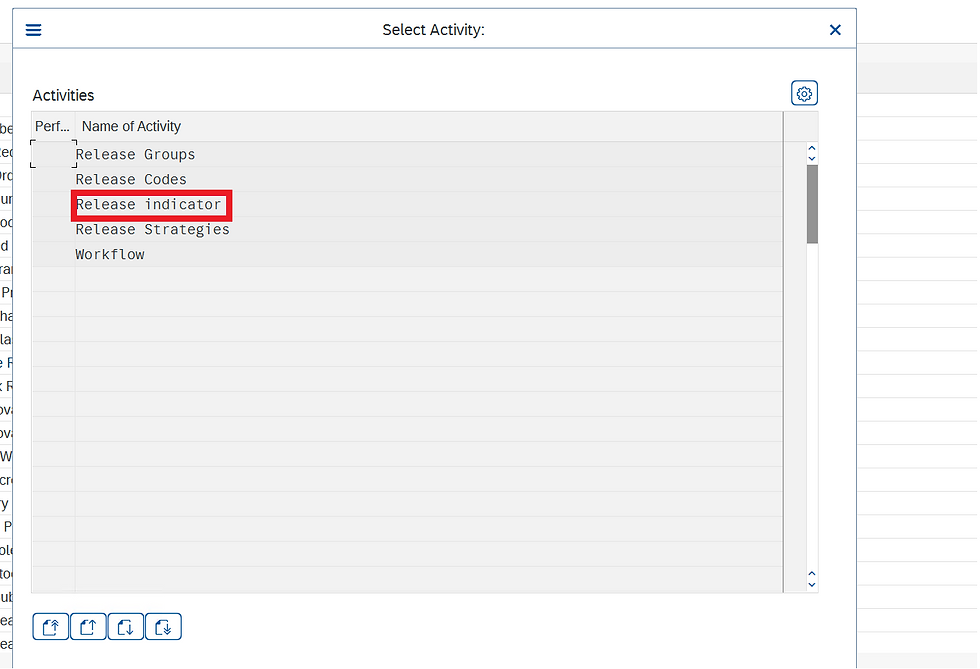
STEP 8: Click on New Entries to create a new release indicator.
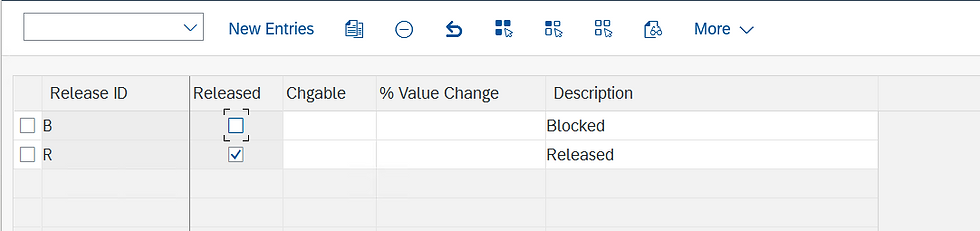
STEP 9: Fill in the release ID, Released status, changeable, and description, and save.
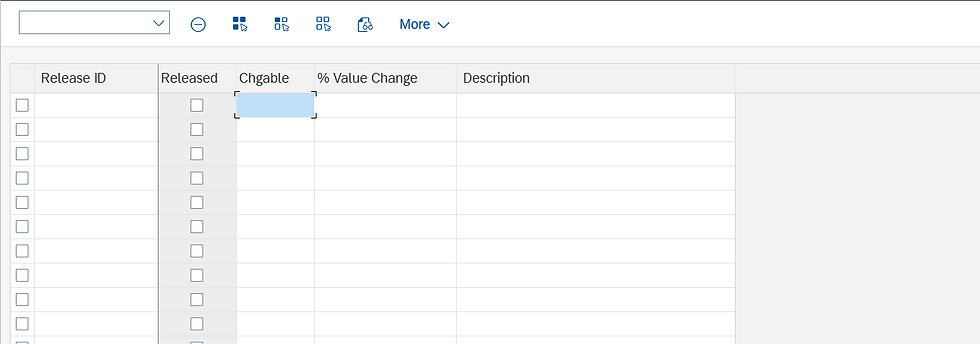
STEP 10: In Define Release Procedure for Purchasing Order, select Release Strategies.
Here we create a release strategy for your release group and assign your release codes accordingly.
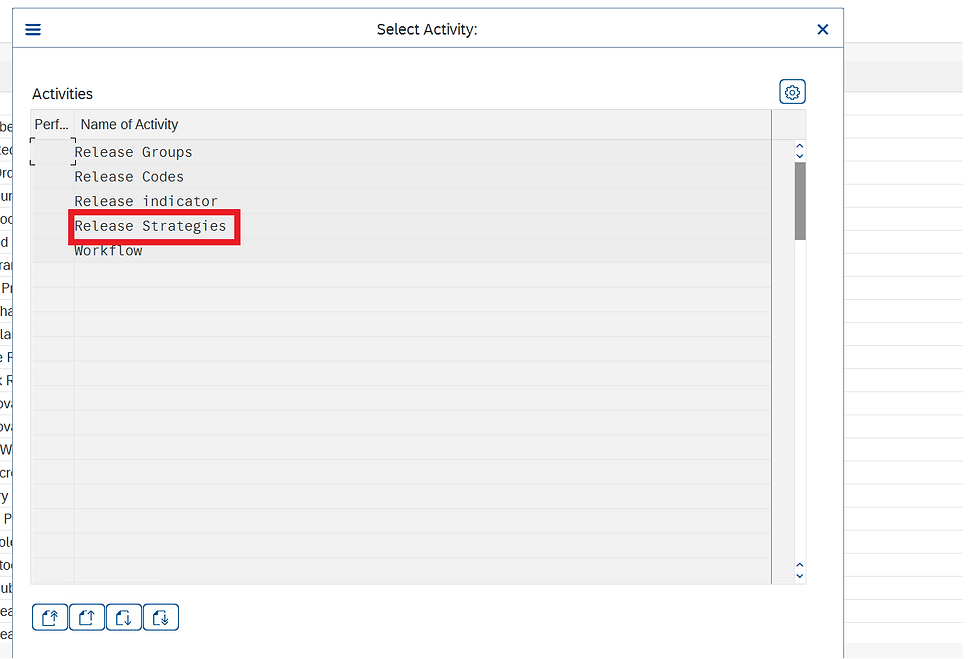
STEP 11: Click on the new entries to create a new release strategy.
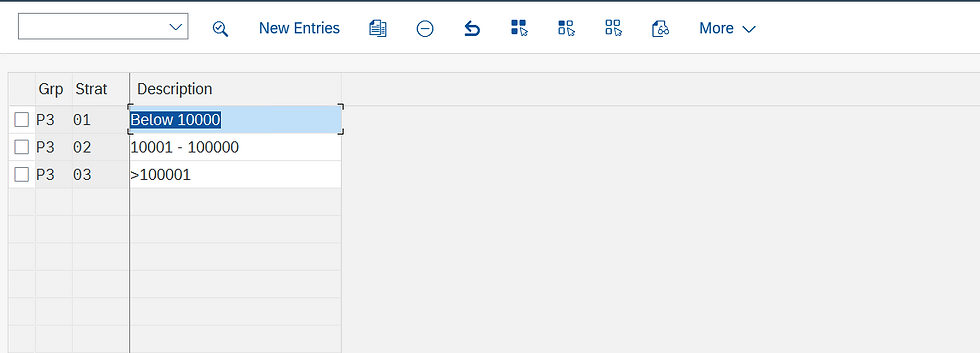
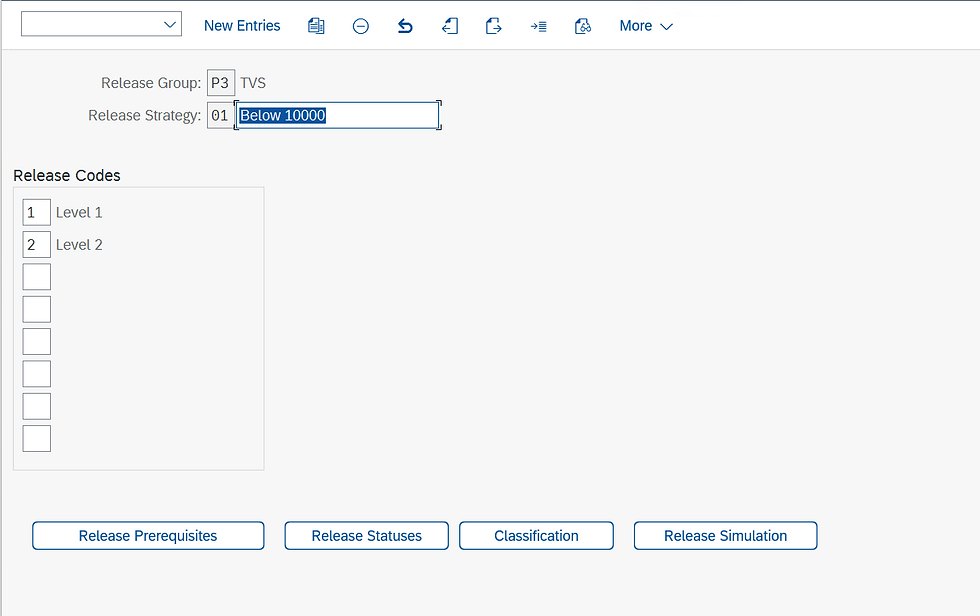
STEP 12: Fill in the Release group, Release Strategy name and description, and Release Codes.
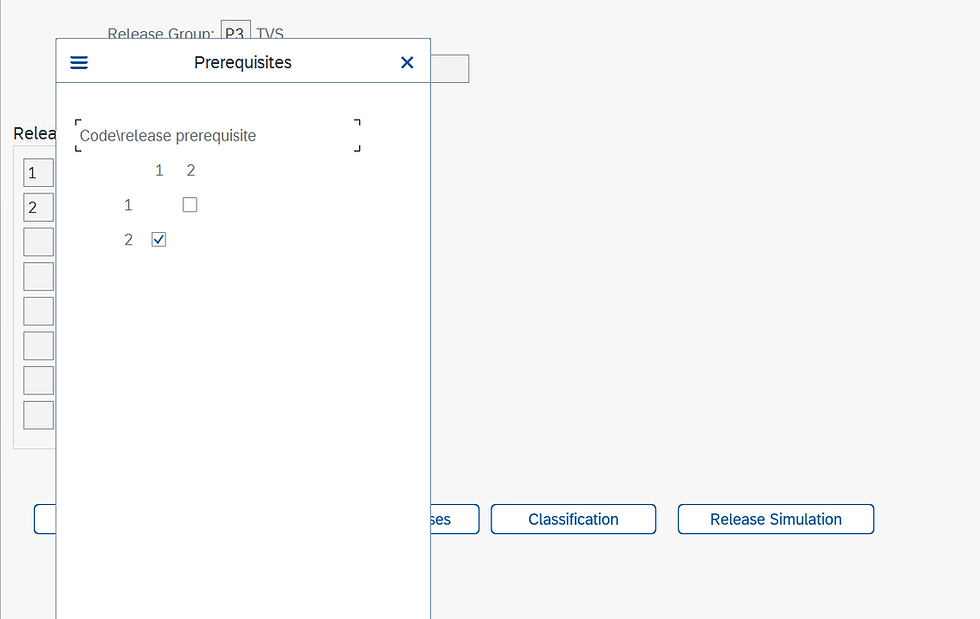
STEP 13: Click on the Release Prerequisite, select the release codes according to business requirements, and click on Continue.
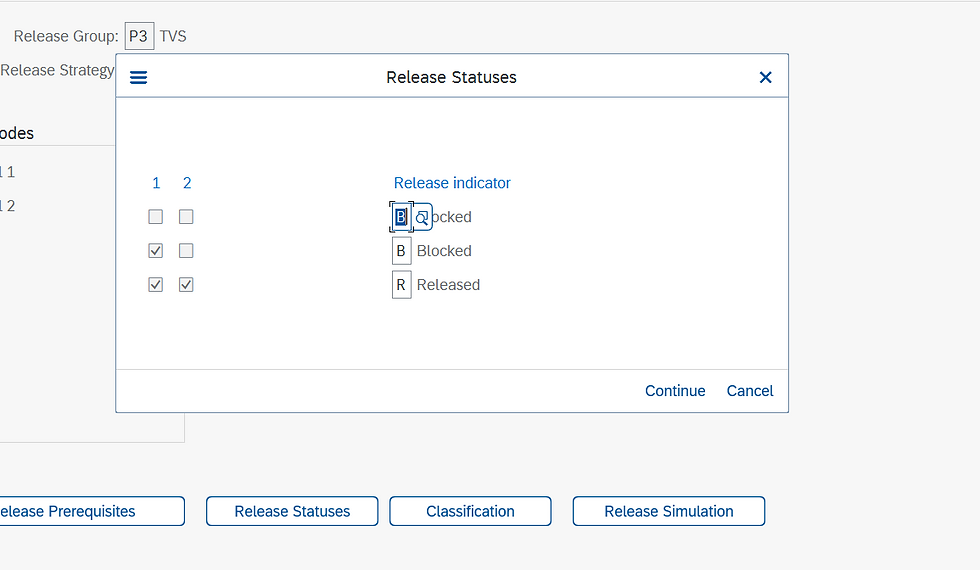
STEP 14: Click on Release Statuses, assign release codes with release indicators, and click on Continue.
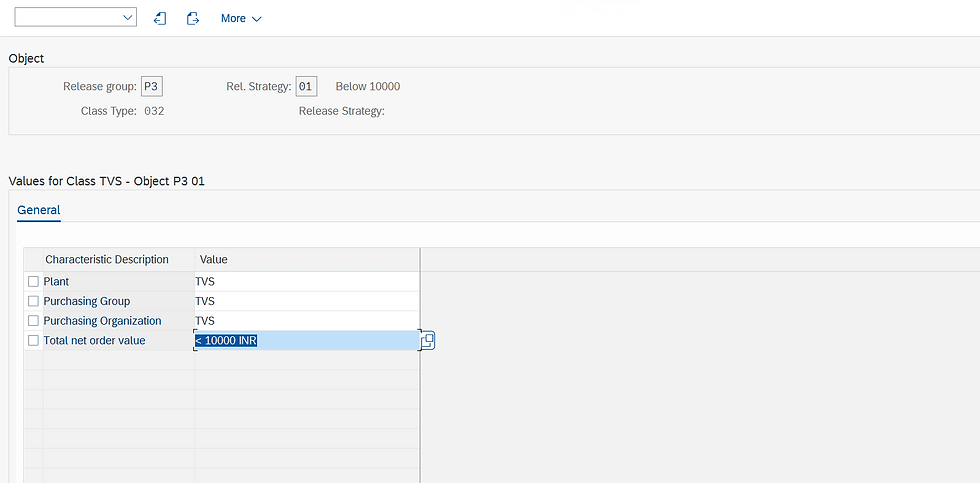
STEP 15: Click on classification, and fill in the values of all the characteristics.
STEP 16: Click on Release Simulation, to Check strategy is working properly.

STEP 17: Click on simulate release for a simulation of the release strategy.
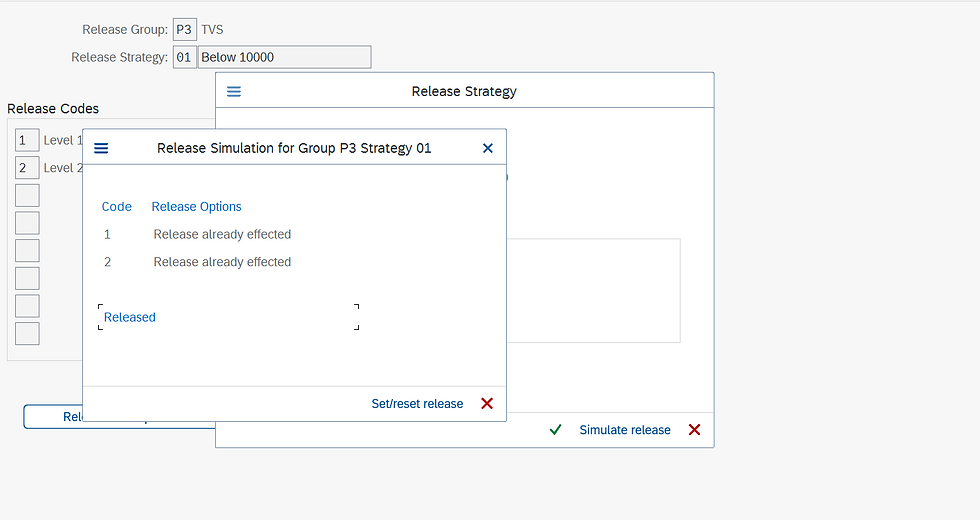
Click on save to save the release strategy.
Thank you for taking the read this blog
Upcoming SAP S/4 HANA Finance (FICO) online weekend batch
Enroll today: https://www.gauravconsulting.com/product-page/sap-s-4-hana-finance-beginners-live-training
For complete video package of FI, CO, SD, MM, FSCM, CFIN, Logistics & RAR visit the link
#SAPMM #SAPMMEnterpriseStructure #SAPMMArchitecture #EnterpriseStructure #SAPMMInsights #SAPMMEfficiency #SAPMMImplementation #SAPMMSuccess #SAPMMTips #SAPMMAutomation #SAPMMBestPractices #SAPMMEducational #SAPMMGuide #SAPMMExpertise #SAPMMTraining #SAPMMConsulting #SAPMMWorkflow #SAPMMSolutions #SAPMMBusinessProcesses #SAPMMConsultants


Hôm nay mình đang lướt qua một vài trang mạng và thấy nhiều bàn về gmnc đặc biệt là về các thông tin có thể thao. Mình chưa sử dụng lâu nên muốn hỏi thêm các bác đã theo dõi thường xuyên trải nghiệm thực tế thế nào. Mình cũng khá quan tâm việc nền tảng kết hợp giữa bảo mật tài khoản và nhiều lựa chọn giao dịch nên lúc dùng cảm thấy yên tâm hơn. tạo cảm giác dễ tìm kiếm thông tin nên người mới cũng không mất nhiều thời gian để làm quen.
Trước đây mình từng thấy https://789clubb.mobile/ vài lần nhưng gần đây mới có thời gian ấn vào xem kỹ hơn một chút. Mình chủ yếu quan sát bố cục địa phương và cách các phần thông tin được đặt trên trang. Tổng thể khá thoáng nên việc xác định từng khu vực không bị mất nhiều thời gian, thao tác chuyển mục cũng phản hồi nhanh. Mình chưa sử dụng lâu nên muốn hỏi thêm các bác đã theo dõi thường xuyên trải nghiệm thực tế thế nào.
https://tylebongda.si/ nhìn kiểu như mấy site mình từng lướt trước đây nhưng bớt rối hơn hẳn, nên mình vào thử cho biết chứ không định xem kỹ.. Chỉ lướt nhanh tổng thể nên chưa tìm hiểu sâu, nhưng ấn tượng ban đầu là bố cục khá rõ ràng, các phần được chia hợp lý nên nhìn không bị rối mắt. Nội dung hiển thị gọn gàng, dễ theo dõi, thanh menu đặt ở vị trí dễ thấy nên việc chuyển qua lại giữa các mục cũng khá nhanh. Khi truy cập bằng điện thoại, trang vẫn hoạt động ổn định, thao tác mượt. Tổng thể mang cảm giác đơn giản, dễ dùng.
Hôm nay mình đang lướt qua một vài trang mạng và thấy nhiều bàn về https://gem88.deals/ đặc biệt là về các thông tin có thể thao. Có hôm mình mở thể thao rồi chuyển qua vài nội dung khác của nền tảng, thao tác nhìn chung vẫn khá thuận mắt. Mình cũng khá quan tâm việc nền tảng kết hợp giữa bảo mật tài khoản và nhiều lựa chọn giao dịch nên lúc dùng cảm thấy yên tâm hơn. tạo cảm giác dễ tìm kiếm thông tin nên người mới cũng không mất nhiều thời gian để làm quen.
Hôm nay mình đang lướt qua một vài trang mạng và thấy nhiều bàn về xsmn đặc biệt là về các thông tin có thể thao. Có hôm mình mở thể thao rồi chuyển qua vài nội dung khác của nền tảng, thao tác nhìn chung vẫn khá thuận mắt. Mình cũng khá quan tâm việc nền tảng kết hợp giữa bảo mật tài khoản và nhiều lựa chọn giao dịch nên lúc dùng cảm thấy yên tâm hơn. tạo cảm giác dễ tìm kiếm thông tin nên người mới cũng không mất nhiều thời gian để làm quen.