


Pricing Procedure in SAP MM
- ADHARSH K S

- Feb 7, 2025
- 4 min read
Updated: Dec 30, 2025
The Pricing Procedure in SAP MM determines how the system calculates the price of a material during purchasing. It defines a structured sequence of conditions (such as discounts, taxes, and surcharges) that influence the final price in a purchase order.
Below is the path to configure :
SPRO > IMG > Materials Management > Purchasing > Conditions >

Maintain Condition Tables
A Condition Table in SAP MM is used to store condition records for pricing elements such as material price, discounts, and taxes. It defines the combination of fields (like vendor, material, purchase organization) that determine how pricing data is retrieved. It works as part of an Access Sequence to fetch relevant pricing records.
STEP 1: Go to T Code M/08 > provide a Table Number and press Enter.
The system only allows condition tables to be created in the valid name space.
Condition tables defined by SAP: valid namespace is from 001 to 500.
Condition tables defined by customers: valid namespace is from 501 to 999.

STEP 2: Select the Fields from right-hand side and click on Select Field then click on Generate to create Table.

STEP 3: either select a Package to SAVE the Condition Table or save as Local Object.

Access Sequence
An Access Sequence in SAP MM is a search strategy that determines how the system retrieves condition records (pricing data) from Condition Tables during the procurement process. It defines the sequence in which the system checks condition records to find the best price for a material. It is assigned to Condition Types.
STEP 4: Click on New Entries > Provide 4 Digit Alphanumeric code for Access Sequence >>

STEP 5: Select the Access Sequence and then click on Accesses (as seen on left-side) Provide the Table Number and Press Enter
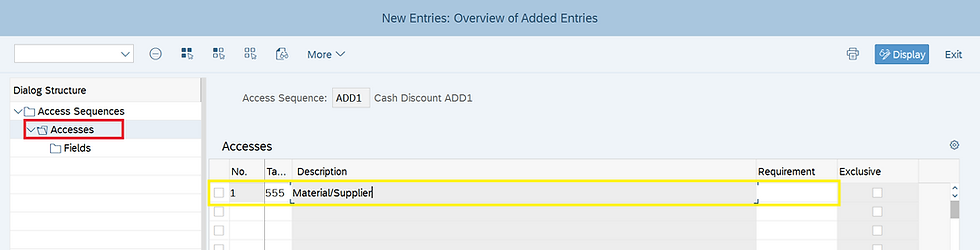
STEP 6: Select the Access and then click on Fields to check the Technical Fields taken by system > SAVE.

Click below for detailed Video Explanation:
Condition Type
A Condition Type in SAP defines a specific pricing element used in purchasing and sales, such as price, discount, surcharge, tax, or freight. It controls how prices are calculated in transactions like Purchase Orders (PO).
STEP 7: Click on New Entries to create condition Type ADDC

STEP 8: Enter the below fields for Condition Type :
Condition Class: Determines the purpose of a condition type (e.g., Price, Discount, Surcharge, Tax, etc.).
Calculation Type: defines how the system calculates the condition value (e.g., price, discount, tax) based on the condition record.
Condition Category: It defines the purpose and processing logic of the condition, such as whether it is a discount, surcharge, tax, or freight charge.
Rounding Rule: The rule that determines how the system rounds off condition values during pricing.
Plus/Minus: Controls whether the condition results in an amount that is negative (discount), positive (surcharge), or whether both positive and negative amounts are possible.
Manual Entries: Indicator that controls the priority within a condition type between a condition entered manually and a condition automatically determined by the system.
Header Condition: If this condition is marked as a header condition, it is possible to enter the condition type in the header condition screen.
Item Conditions: If the conditions of this type are allowed to be entered in the document items.
Delete: Indicator that controls whether the condition type may be deleted from the document.
Amount/Percent: Specifies whether the amount or percentage for the condition type can be changed during document processing.
Pricing Procedure: The system uses the pricing procedure that you enter here to control the use of condition records of this condition type.

STEP 9: Go to T code M/08 or click on "Set calculation Schema - Purchasing"
Click on New Entries and provide Procedure name and Description as seen below and then select the Procedure and click on Control data (left side)

STEP 10: Either Click on New Entries > provide the Step, Condition Type, and other fields / Copy from Standard Pricing Procedure and utilize the condition type of that whichever is necessary.

STEP 11: Go to T Code OMFN (Schema Groups for Suppliers) > Click on New Entries and Provide the 2 Digit Schema Group for Suppliers and Description then SAVE.
Schema Groups for Suppliers: is used to determine which pricing procedure should be applied during procurement transactions

STEP 12: Go to T Code OMFM (Schema Groups for Purchase Organizations)
Click on New Entries and Provide the 4 Digit Schema Group for Purchase Organizations and Description then SAVE.
Schema Groups for Purchasing Organization: They help assign different pricing strategies to different purchasing organizations

STEP 13: T Code OMFP (Assignment Schema Groups for Purchase Organizations )
Click on Position > search for Purchase organization and then provide your Schema Group for Purchase Organization.

STEP 14: Go to T Code OMFO - "Determine Calculation Schema for Standard Purchase Orders "
Click on New Entries and Provide the Schema Group for Purchase Organization, Schema Group for Supplier and Pricing Procedure then SAVE.

Maintain Schema Group Supplier in Supplier's Master Data
STEP 15: Select the BP Role "FLVN01" and go to Purchasing Data Tab then provide the Schema Group Supplier > SAVE.

Maintain Condition Record for Condition Type
A Condition Record in SAP is a stored pricing-related entry that determines the price, discount, surcharge, tax, or freight based on predefined conditions.
STEP 16: Go to T code MEK1 > Enter the Condition Type

STEP 17: Enter Material, Supplier, Amount, Unit and valid from date > SAVE.

Below is the Conditions for the Purchase Order picked by system:

The Pricing Procedure is a fundamental mechanism that ensures accurate price determination in procurement and inventory management. By configuring condition types, access sequences, and calculation schemas, organizations can automate price calculations based on business rules.
#SAPfico #SAPerp #SAPs4HANA #PricingProcedure #ConditionType #ConditionRecord #ConditionTable #AccessSequence #PricingProcedure #MEK1 #SAPconsulting #PravikTech #SAPcommunity


Mình có lần lướt đọc mấy trao đổi trên mạng شيخ روحاني thì thấy nhắc nên cũng tò mò mở ra xem thử cho biết. Mình không tìm hiểu sâu جلب الحبيب chỉ xem qua trong thời gian ngắn để quan sát bố cục جلب الحبيب cách sắp xếp شيخ روحاني các mục và trình bày nội شيخ روحاني dung tổng thể. Cảm giác là các phần được trình bày khá gọn, các شيخ روحاني mục rõ ràng nên đọc lướt cũng không bị rối Berlinintim, với mình như شيخ روحاني vậy là đủ để nắm tin cơ bản rồi. جلب الحبيب
good article TARTOTO
Clear, step‑by‑step breakdown of condition tables, access sequences, condition types, and schema groups makes the whole SAP MM pricing procedure feel very approachable, especially for consultants who need to connect configuration with real PO pricing behavior; it’s the kind of guide where you naturally want to pause after each SPRO or T‑Code step and jot down your own project notes or variants, and for that, a distraction‑free browser notepad like Protected Notepad Online is a handy companion to capture configuration ideas, test cases, and client‑specific pricing rules while you experiment in the system.
Great explanation of the pricing procedure in SAP MM! The way you broke down condition types, access sequences, and calculation schema makes it much easier to understand how pricing is determined during procurement.
I especially liked how you highlighted the role of configuration in ensuring accurate pricing—this is something many beginners overlook. Proper setup really makes a difference in avoiding discrepancies in purchase orders and invoices.
Also, during long SAP sessions, maintaining system efficiency and clear audio can really help productivity—sometimes even using a speaker cleaner can make a noticeable difference in overall sound clarity.
Overall, very informative and practical content. Looking forward to more insights like this!
I found matlab assignment help useful while practicing MATLAB problems, especially for understanding logic errors and improving my coding approach.