


How to Perform Value Adjustments for Overdue Receivables in SAP ?

At the end of every financial period, one of the most critical yet often overlooked tasks in accounts receivable management is performing value adjustments for overdue receivables.
This closing operation ensures that your financial statements accurately reflect the real collect ability of outstanding customer balances - a cornerstone of sound accounting practice.
What are Value Adjustments for Overdue Receivables?
Value adjustments (also known as bad debt provisions) allow organizations to recognize the diminished value of these receivables on the balance sheet, ensuring compliance with accounting standards and a true picture of financial health.
STEP 1: Define the Value Adjustment Key ( T Code OB_7)
Configuration Path: Financial Accounting → Accounts Receivable and Accounts Payable → Business Transactions → Closing → Valuate → Valuations → Define Value Adjustment Key

Here, you define or review the Value Adjustment Key - a configuration object that governs how overdue receivables are evaluated. This key determines the criteria by which the system identifies at-risk balances and computes the necessary provisions.
STEP 2: Assign the Value Adjustment Key to the Business Partner
This linkage tells SAP which customers are subject to value adjustment processing during the valuation run a simple but essential connection between configuration and master data.

Post a Test Invoice via FB70
Before triggering the valuation run, a baseline invoice is posted using T-code FB70. This creates the open receivable that will be subject to the value adjustment - giving the system a real document to evaluate during execution.

Step 4: Run the "Perform Further Valuations" App
With master data configured and a live receivable in place, the actual valuation happens through Perform Further Valuations Fiori app.

The process within the app flows as follows:
Enter the Run Date and Identification as specified in your organization's instructions, then click Maintain.


Fill in all required details per the provided instructions, then navigate to Selection Options.

Select the Company Code, Customer, and Document Number, then click Execute and Save your entries.

Step 5: Dispatch, Review, and Forward
Once the run is saved, the workflow proceeds through a quick but important verification loop:
Dispatch - triggers the valuation process.

Display - lets you inspect which documents the system has picked up for adjustment.

Verify - this is a critical checkpoint. Proceed to the next step only if the system has correctly identified the expected documents.

Forward - confirms and posts the valuation documents once verification passes.

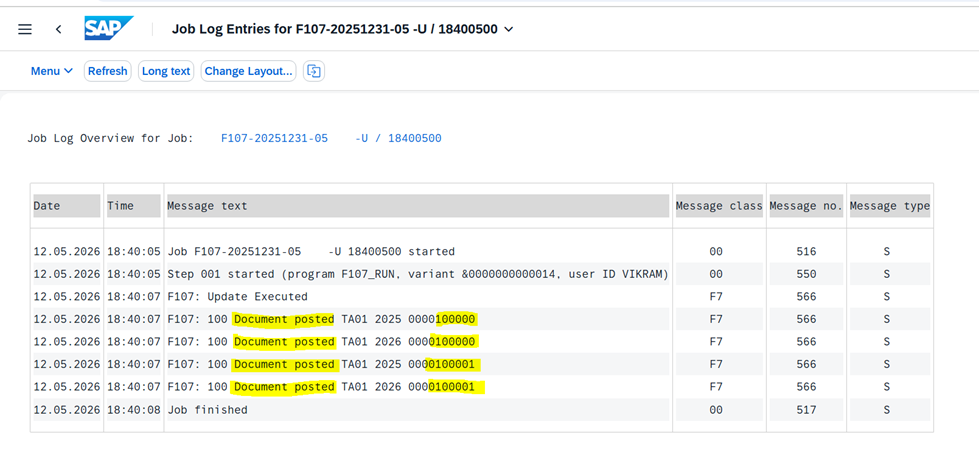
Result: A Valuation Document Posted
After successfully completing these steps, a Valuation Document is posted - a formal accounting entry that adjusts the book value of the overdue receivable. This document creates a clear audit trail and feeds into period-end financial reporting.

Documents Posted
By leveraging SAP's built-in valuation framework - from OB_7 configuration through to Fiori app execution - finance teams can close their books with confidence, knowing that every overdue receivable has been properly assessed and provisioned.


I was looking for the latest swig closing time information.Knowing the hours can make planning a visit easier.Thanks for sharing any useful details.
Vừa mở v79 lên là thấy giao diện kiểu đồng bộ thật, bấm qua lại không bị lệch nhịp hay phải đoán xem nút nằm đâu. Nội dung cũng chia thành từng khối rõ ràng nên lướt nhanh vẫn nắm được ý chính, không bị ngợp chữ. Mình thích cái cách họ viết kiểu “ăn khớp” ngay từ đầu, đọc vài dòng là hiểu họ muốn hướng tới trải nghiệm liền mạch chứ không màu mè. Kéo xuống thấy các tiêu đề và box tách bạch, nhìn phát là biết phần nào là nội dung chính, phần nào chỉ là thông tin kèm theo.
Been using Pico Image for a while now for resizing and compressing images. It runs entirely in the browser so nothing gets uploaded to a server, which I find reassuring. Background removal works pretty well too, saves me from opening heavier software for simple tasks.
Language skills are an important part of effective communication. They include four main abilities: listening, speaking, reading, and writing. Developing these skills helps us express our ideas clearly, understand others, and communicate confidently in both academic and professional situations.
mình có lần lướt đọc mấy trao đổi trên mạng شيخ روحاني thì thấy nhắc nên cũng tò mò mở ra xem thử cho biết. mình không tìm hiểu sâu chỉ xem qua trong thời gian ngắn để quan sát bố cục cách sắp xếp جلب الحبيب các mục và trình bày nội جلب الحبيب dung tổng thể. cảm giác là các phần được trình bày khá gọn, các hurentest berlin mục rõ ràng Huren Berlin nên đọc lướt cũng không bị rối với mình như vậy là đủ để nắm tin cơ bản rồi. جلب الحبيب
👍