


How to configure automatic payment program (FBZP) in SAP S4 HANA

Updated: Nov 17, 2025
"APP" stands for "Automatic Payment Program." It is a functionality within SAP that allows organizations to automate the payment process for vendors and creditors (Business Partner).
6 STEPS IN CONFIGURATION:

STEP 1:- ALL COMPANY CODE

Company Code: – Update the company code: BMW1
Sending company code : – Update the sending company code, this is optional field. This is the company code which is known to the vendor as sending the payments to them.
Paying company code : – Update the paying company code: BMW1. This is the company code which is known to the vendor as paying company to them.
Choose separate payment per business area check box if you want to run payment separately for each business area.
Update the tolerance days for payable by which cash discount period for the due date for net payment.
If you want process maximum cash discount irrespective to payment terms, choose this option.
If you want to make payments for special G/L transactions like down payment, advance to vendors, update the special G/L indicator from the given list.
STEP 2: -PAYING COMPANY CODES
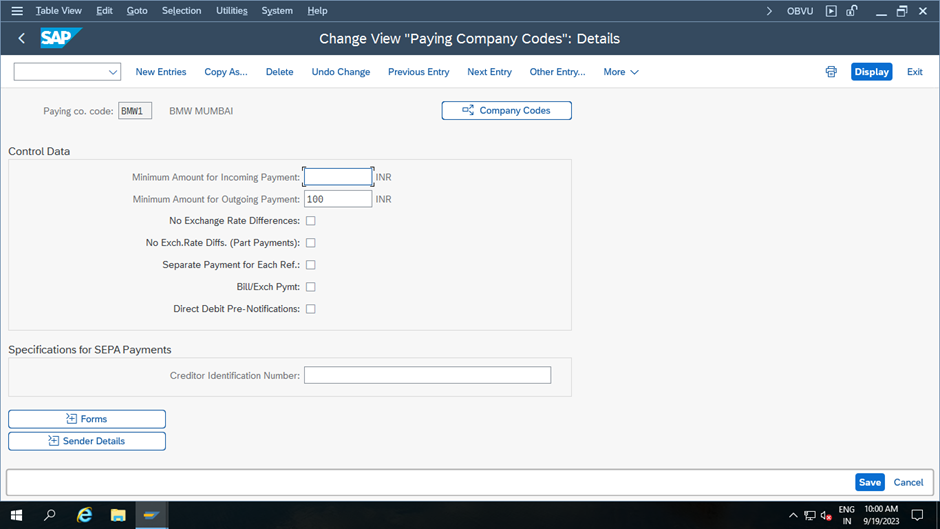
Paying co. Code : – Update the payment company code: BMW1
Minimum amount for incoming payment: – minimum incoming payment: 0
Minimum amount for outgoing payment: – minimum outgoing payment: 100
No exchange rate difference: – If you don’t want to consider the exchange rate difference while making payment, choose this option.
Separate payment for each ref: – Check this option if you want to pay separately as per invoice wise.
Bill/exchange payment: – Select this option if the payment is made through bills of exchange.
Form for the payment advice: – Choose the payment advice form the list, press F4 and choose form as per your requirements.
Sender details: – Update the details of sender that prints on form i.e., Text Id, Letter header, footer, etc.
BOOK YOUR TICKETS NOW - https://www.gauravconsulting.com/event-details/master-sap-s-4-hana-finance-public-cloud-edition
Use Promo Code - OFFER1K to get 1000 INR Discount

BOOK YOUR TICKETS NOW - https://www.gauravconsulting.com/event-details/master-sap-s-4-hana-finance-public-cloud-edition
Use Promo Code - OFFER1K to get 1000 INR Discount
STEP 3: -PAYMENT METHOD IN COUNTRY REGION
Now the list of defined payment methods for country IN displays on top of the screen. To define new payment method for country as per the requirements of project.

On new entries screen the following details:

Country: – IN country key that you like to configure payment method.
Payment method: – R that identifies as payment method for country in SAP.
Description: – RTGS of payment method.
Payment Method: – Choose the payment type i.e., Outgoing payments or incoming payments.
Payment Method classification: – Choose the type of payment method i.e., bank transfer.
Choose the option allowed for personal payments if the company wants this payment method for paying personal payments.
Posting details: – Specify the document type for payment and clearing document type.
STEP 4:- PAYMENT METHOD IN COMPANY CODES:
On new entries payment method for company code BMW1

Paying co. code: – BMW1
Payment Method: – R (RTGS)
Amount Limits: – Update the minimum and maximum amount for payment transactions.
Payment per due day: – Choose this option if the company wanted to make payment as per due date.
Foreign Payment/ foreign currency payments: – Choose the option as per requirements.
Configuration related to House Bank and Bank Determination will be covered in my next Blog.
UPCOMING SAP S4 HANA ONLINE BATCHES - GET UPTO 30% Discount
SAP Controlling - 20th April'24 @8:00AM, IST
Course link : https://www.gauravconsulting.com/product-page/sap-s-4-hana-controlling-co-online-training
SAP S4 HANA FICO - 07th May'24 @8:00PM, IST
Course link: https://www.gauravconsulting.com/product-page/sap-s-4-hana-finance-beginners-online-batch
SAP Sales & Distribution (SD) - 27th April'24 @8:00AM, IST
Course link: https://www.gauravconsulting.com/product-page/sap-s4-hana-sales-distribution-sd-live-training
SAP EWM - 8th April'24 @9AM, IST


While reviewing multiple sources, I noticed VBCASH88 presents its information very clearly. The shop section on VBCASH88 complements it perfectly, giving a full picture of what’s available.
Reviewing VBCASH88 gave me the context I needed before exploring VBCASH88, and both pages worked together to provide a complete reference.
I spent some time analyzing VBCASH88, and it provides a well-organized summary. Exploring VBCASH88 afterwards added the detailed context I needed.
Reading through VBCASH88 gave me a good overview, and following up with VBCASH88 helped me see how the information translates into actual offerings.
Useful reference. I reviewed asgacor and then analyzed asgacor to get clearer insight.