


Pricing Procedure in SAP MM

Updated: Dec 30, 2025
The Pricing Procedure in SAP MM determines how the system calculates the price of a material during purchasing. It defines a structured sequence of conditions (such as discounts, taxes, and surcharges) that influence the final price in a purchase order.
Below is the path to configure :
SPRO > IMG > Materials Management > Purchasing > Conditions >

Maintain Condition Tables
A Condition Table in SAP MM is used to store condition records for pricing elements such as material price, discounts, and taxes. It defines the combination of fields (like vendor, material, purchase organization) that determine how pricing data is retrieved. It works as part of an Access Sequence to fetch relevant pricing records.
STEP 1: Go to T Code M/08 > provide a Table Number and press Enter.
The system only allows condition tables to be created in the valid name space.
Condition tables defined by SAP: valid namespace is from 001 to 500.
Condition tables defined by customers: valid namespace is from 501 to 999.

STEP 2: Select the Fields from right-hand side and click on Select Field then click on Generate to create Table.

STEP 3: either select a Package to SAVE the Condition Table or save as Local Object.

Access Sequence
An Access Sequence in SAP MM is a search strategy that determines how the system retrieves condition records (pricing data) from Condition Tables during the procurement process. It defines the sequence in which the system checks condition records to find the best price for a material. It is assigned to Condition Types.
STEP 4: Click on New Entries > Provide 4 Digit Alphanumeric code for Access Sequence >>

STEP 5: Select the Access Sequence and then click on Accesses (as seen on left-side) Provide the Table Number and Press Enter
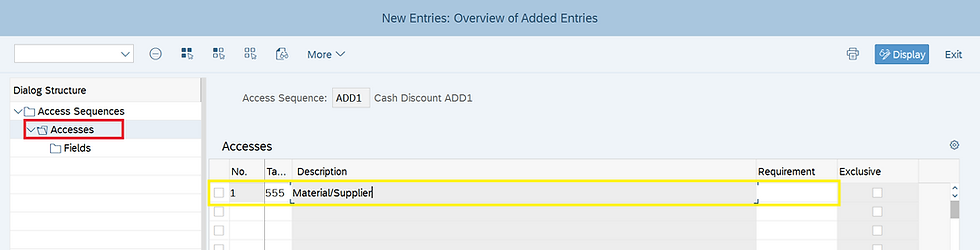
STEP 6: Select the Access and then click on Fields to check the Technical Fields taken by system > SAVE.

Click below for detailed Video Explanation:
Condition Type
A Condition Type in SAP defines a specific pricing element used in purchasing and sales, such as price, discount, surcharge, tax, or freight. It controls how prices are calculated in transactions like Purchase Orders (PO).
STEP 7: Click on New Entries to create condition Type ADDC

STEP 8: Enter the below fields for Condition Type :
Condition Class: Determines the purpose of a condition type (e.g., Price, Discount, Surcharge, Tax, etc.).
Calculation Type: defines how the system calculates the condition value (e.g., price, discount, tax) based on the condition record.
Condition Category: It defines the purpose and processing logic of the condition, such as whether it is a discount, surcharge, tax, or freight charge.
Rounding Rule: The rule that determines how the system rounds off condition values during pricing.
Plus/Minus: Controls whether the condition results in an amount that is negative (discount), positive (surcharge), or whether both positive and negative amounts are possible.
Manual Entries: Indicator that controls the priority within a condition type between a condition entered manually and a condition automatically determined by the system.
Header Condition: If this condition is marked as a header condition, it is possible to enter the condition type in the header condition screen.
Item Conditions: If the conditions of this type are allowed to be entered in the document items.
Delete: Indicator that controls whether the condition type may be deleted from the document.
Amount/Percent: Specifies whether the amount or percentage for the condition type can be changed during document processing.
Pricing Procedure: The system uses the pricing procedure that you enter here to control the use of condition records of this condition type.

STEP 9: Go to T code M/08 or click on "Set calculation Schema - Purchasing"
Click on New Entries and provide Procedure name and Description as seen below and then select the Procedure and click on Control data (left side)

STEP 10: Either Click on New Entries > provide the Step, Condition Type, and other fields / Copy from Standard Pricing Procedure and utilize the condition type of that whichever is necessary.

STEP 11: Go to T Code OMFN (Schema Groups for Suppliers) > Click on New Entries and Provide the 2 Digit Schema Group for Suppliers and Description then SAVE.
Schema Groups for Suppliers: is used to determine which pricing procedure should be applied during procurement transactions

STEP 12: Go to T Code OMFM (Schema Groups for Purchase Organizations)
Click on New Entries and Provide the 4 Digit Schema Group for Purchase Organizations and Description then SAVE.
Schema Groups for Purchasing Organization: They help assign different pricing strategies to different purchasing organizations

STEP 13: T Code OMFP (Assignment Schema Groups for Purchase Organizations )
Click on Position > search for Purchase organization and then provide your Schema Group for Purchase Organization.

STEP 14: Go to T Code OMFO - "Determine Calculation Schema for Standard Purchase Orders "
Click on New Entries and Provide the Schema Group for Purchase Organization, Schema Group for Supplier and Pricing Procedure then SAVE.

Maintain Schema Group Supplier in Supplier's Master Data
STEP 15: Select the BP Role "FLVN01" and go to Purchasing Data Tab then provide the Schema Group Supplier > SAVE.

Maintain Condition Record for Condition Type
A Condition Record in SAP is a stored pricing-related entry that determines the price, discount, surcharge, tax, or freight based on predefined conditions.
STEP 16: Go to T code MEK1 > Enter the Condition Type

STEP 17: Enter Material, Supplier, Amount, Unit and valid from date > SAVE.

Below is the Conditions for the Purchase Order picked by system:

The Pricing Procedure is a fundamental mechanism that ensures accurate price determination in procurement and inventory management. By configuring condition types, access sequences, and calculation schemas, organizations can automate price calculations based on business rules.
#SAPfico #SAPerp #SAPs4HANA #PricingProcedure #ConditionType #ConditionRecord #ConditionTable #AccessSequence #PricingProcedure #MEK1 #SAPconsulting #PravikTech #SAPcommunity


lc88 giúp tôi đánh giá cách thông tin được sắp xếp trong khu vực thanh toán. Tôi thường tìm hiểu vị trí các phương thức giao dịch, những trường cần điền và phần thông tin hướng dẫn trước khi thực hiện thao tác. Khi quan sát Casino, Xổ số và Nổ hũ, tôi chú ý đến cách giao diện phân biệt nội dung giải trí với chức năng quản lý tài chính. Những thông tin về điều kiện, giới hạn và trạng thái xử lý cần được thể hiện dễ hiểu để người dùng chủ động kiểm tra. Tôi cũng quan tâm đến khả năng xem lại lịch sử giao dịch. Với tôi, tính minh bạch trong trình bày quan trọng…
tk88 giúp tôi đánh giá cách kết nối giữa nội dung giới thiệu thương hiệu và những thông tin cập nhật. Tôi quan sát vị trí các bài viết, sự kiện và thông báo để xem người đọc có thể phân biệt nội dung mới với phần giới thiệu tổng quan hay không. Trong quá trình tìm hiểu, Sicbo, Roulette và Rồng Hổ là ba ví dụ để tôi đối chiếu cách trình bày các lựa chọn thuộc nhóm Casino. Tôi cũng xem xét cách tiêu đề và hình ảnh được sử dụng xuyên suốt những khu vực khác nhau. Với tôi, việc phân biệt rõ nội dung tham khảo và danh mục trò chơi giúp người đọc xác định đúng…
789p giúp tôi đánh giá tổng thể mối liên kết giữa các danh mục và chức năng trên nền tảng. Tôi quan sát cách trang chủ dẫn đến từng khu vực, cách thông tin được phân cấp và khả năng quay lại những mục đã truy cập. Trong quá trình trải nghiệm, tôi lựa chọn Roulette, tennis và nổ hũ để xem xét sự khác biệt trong cách trình bày nội dung. Tôi cũng kiểm tra mối liên hệ giữa khu vực trò chơi, tài khoản và giao dịch nhằm hình dung hành trình sử dụng xuyên suốt. Với tôi, một hệ thống điều hướng có logic không chỉ giúp việc tìm kiếm nhanh hơn mà còn tạo cảm giác nhất…
Thank you for sharing this detailed step-by-step guide on configuring the pricing procedure in SAP MM! Breaking down everything from condition tables and access sequences to condition types and calculation schemas makes a complex process much easier to follow. Clear configuration examples like this are incredibly helpful for consultants and professionals working on SAP implementations.
If you're looking to expand your professional skill set beyond tech and explore new career paths, check out this comprehensive Medical sales course for great industry insights and training.
go88 có thể được đánh giá qua cách hiển thị thông báo khi xảy ra lỗi hoặc khi một thao tác chưa hoàn tất. Trong quá trình sử dụng, người dùng cần phân biệt được trường hợp nhập sai thông tin, kết nối gián đoạn hay hệ thống chưa phản hồi. Nếu thông báo chỉ hiện một câu chung chung, họ khó xác định nên thử lại, kiểm tra dữ liệu hay tìm hướng dẫn khác. Những thông báo rõ ràng giúp hạn chế việc lặp thao tác không cần thiết và giảm nguy cơ hiểu nhầm trạng thái hiện tại. Với tôi, một hệ thống dễ sử dụng nên giải thích vấn đề bằng ngôn ngữ đơn giản, đồng thời…