


DMEE Configuration in SAP S/4HANA

Payment processing in SAP becomes significantly more efficient when automated using the Data Medium Exchange Engine (DMEE) functionality. DMEE enables organizations to generate payment files (such as XML, flat files, etc.) in formats required by banks, ensuring seamless electronic payments.
What is Payment DMEE in SAP?
Payment DMEE (Data Medium Exchange Engine) is used to generate structured payment files that can be sent to banks for processing vendor or customer payments.
Key Transaction Codes Used
T-Code | Purpose |
|---|---|
DMEEX | Create and maintain payment file structure |
OBPM1 | Define payment medium formats |
FBZP | Configure payment methods and assign DMEE formats |
OBPM4 | Assign variants for file generation |
Step-by-Step Configuration
STEP 1: To create Payment Medium Format Tree with T Code DMEEX
Select Tree Type as PAYM and Instead of creating from scratch you can Copy a standard SAP format tree and modify it as per business requirements, remove the tick of Copy as a child and click on OK.

STEP 2: Provide Description, Delete unnecessary nodes, Add required elements, Map fields using - Structure fields (FPAYH, FPAYP) or Constant or Aggregations and click on Activate to save.

STEP 3: Create Payment Medium Format with T Code OBPM1, Copy a standard payment medium format, Provide Format name and description, enable Mapping Using DMEE Engine then click on Copy and Save.

STEP 4: Assign Payment Medium to Payment Method with T Code FBZP and Navigate to Payment Methods in Country/Region
Double-click on your payment Method for your Company code.

STEP 5: Scroll down to Payment Medium Tab and select Use Payment Medium Workbench and enter your Format then click on Format in Company Code

Our upcoming SAP S/4HANA Finance Live Training batch starts 26th April, 2026

STEP 6: Enter your Company Code, Payment Method, House Bank, Payment Medium Format, select Alt. format Type and Save.

STEP 7: Assign Variants for File Generation with T Code OBPM4 and Select your Payment Medium and click on Edit

STEP 8: Assign variants for your Company Code and Bank

STEP 9: Enter Payment Medium Format and Enable Screen Output check box then click on Attributes

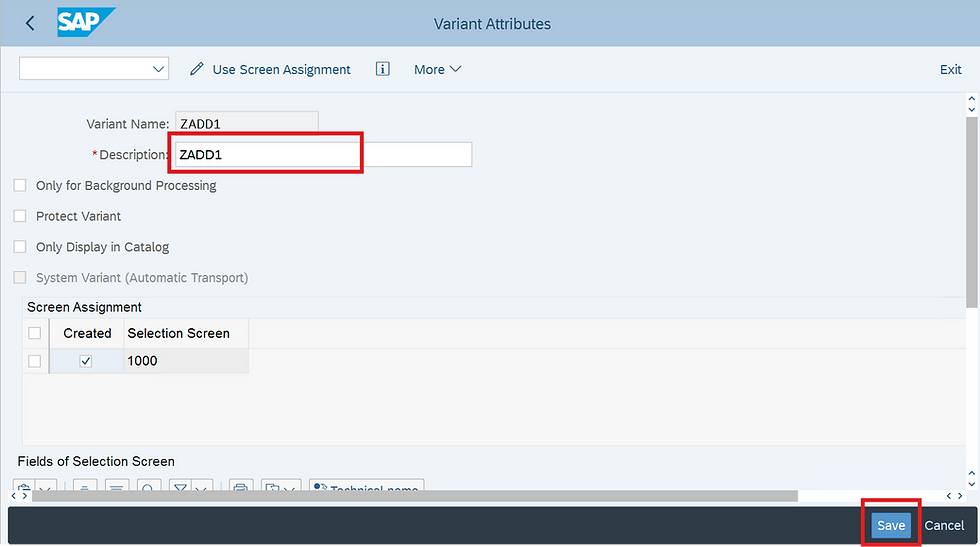
STEP 10: Provide Description and click on Save.
To view DME File after executing APP Run
Click on Environment > Payment Medium > DME Administration

Position cursor on line and click on Edit > Display DME Contents

DMEE configuration might look complex initially, but once you understand the flow:
👉 DMEE → OBPM1 → FBZP → F110 → File Output
…it becomes much easier to troubleshoot and enhance.
If you're working in SAP FICO or FSCM, mastering DME is a high-value skill that directly impacts real business payments.


rikvip lúc đầu mình cũng hơi lăn tăn nên chỉ bấm vào xem qua thôi. Kéo xuống một hồi mới nhận ra trang này họ chia nội dung theo từng khối khá gọn, kiểu mỗi đoạn có tiêu đề to rõ ràng nên mắt đỡ phải dò, và phần chữ giới thiệu về “cổng game bài đổi thưởng” được đặt ngay đầu nên đọc lướt cũng hiểu họ đang nói về gì; mình còn để ý họ có nhấn chuyện giao dịch an toàn nên cảm giác họ cố làm người xem yên tâm hơn một chút. Menu thì nằm chỗ dễ thấy, chuyển qua lại không cần tìm lâu, với mấy box tóm tắt thông tin đặt ngay dưới…
8XBET nhìn qua thì mình thấy nó giống mấy trang thông tin giải trí mình hay lướt trước đây, kiểu vào là biết đang đứng ở mục nào chứ không phải mò như đi trong mê cung, nên mình thử đọc vài phút cho vui và cũng hơi bất ngờ vì chữ nghĩa chia khúc rõ ràng, không nhồi một cục dài ngoằng. Mình chỉ liếc phần giới thiệu nền tảng thôi. Có ghi chuyện ra mắt năm 2018 và trụ sở ở Manila, đọc kiểu “à, ít ra họ cũng để thông tin cụ thể cho người mới bớt lăn tăn”. Cuộn xuống cũng mượt. Chuyển mục không cần bấm nhiều. Và mình thích nhất là cái tiêu đề…
LLWIN có gì mà người ta gắn thêm “AROMA” với “Trang chủ Chính Thức 2026” nghe lạ tai vậy? Mình thử ghé qua xem nhanh trong lúc rảnh, kiểu chỉ nhìn bố cục với cách họ đặt thông tin chứ không đào sâu, và thấy trang sắp xếp khá dễ theo dõi nên đọc lướt vẫn nắm được ý chính. Phần giới thiệu thương hiệu để ngay chỗ nổi, có nhắc chuyện thành lập từ 2012 và nói về minh bạch công bằng nên ít nhất người mới cũng hiểu họ đang định hướng gì. Menu đặt ngay trên, chuyển mục qua lại không bị rối. Chữ với khoảng trắng nhìn thoáng. Mấy khối nội dung dạng “Top…” tách thành…
X88 có đáng mất công ngó qua không? Mình cũng hơi nghi ngại kiểu mấy trang nội dung dài lê thê, nhưng lướt trên điện thoại thì thấy họ chia thông tin thành từng khối lớn nên đọc đỡ mệt, cuộn xuống là bắt được ý chính chứ không bị dồn chữ một cục. Menu để ngay chỗ dễ chạm, chuyển qua lại mấy mục khá nhanh, và mình thử bấm vài lần thì trang tải ổn, không bị đứng hình kiểu phải đợi hoài. Điểm mình để ý là họ có đoạn nói rõ về chuyện giấy phép PAGCOR, đặt tách riêng nên ai quan tâm pháp lý sẽ thấy ngay. Nói chung mình chỉ xem cách họ trình…
KP88 lúc đầu mình cũng hơi nghi ngờ vì mấy trang dạng này hay nói nhiều mà vào lại rối, nên mình chỉ định lướt nhanh xem có dễ tìm thông tin và thao tác không thôi, ai ngờ bố cục lại khá gọn, chữ dễ nhìn, cuộn xuống thấy các phần được tách thành từng khối rõ ràng nên đọc trên điện thoại cũng đỡ mất công mò. Mình cũng để ý họ có nhắc tới giấy phép PAGCOR với chứng chỉ GEOTRUST ở khu thông tin, ít nhất là có ghi cụ thể chứ không để trống. Menu đặt ngay tầm tay nên chuyển mục không bị lạc. Các tiêu đề kiểu “link vào chính thức” nằm ngay…