


Data Migration Cockpit in SAP S/4 HANA

Data Migration Cockpit (DMC) in SAP is a tool within the SAP system that is used to migrate data from Legacy data system into the SAP S/4 HANA system.
The DMC in SAP S/4HANA offers a user-friendly interface for managing various aspects of the data migration process, including data mapping, upload, and error handling. It aims to simplify and accelerate the migration of business data.
Users can use the DMC to define mapping rules, execute data migration activities, monitor the progress of migrations, and handle any errors that may occur during the process.
Evolution of Data Migration tool over time by SAP

LSMW (Legacy System Migration Workbench) - In S/4 HANA, LSMW was redundant. Instead, LSMON (Migration Object Modeler) and LTMC functionality was Introduced.
LTMC (Legacy Transfer Migration Cockpit) - Here ready-made templates were available to upload the data. later, Transaction LTMC was deprecated and now can no longer be used to migrate data to SAP S/4HANA.
DMC (Data Migration Cockpit) - DMC is advanced Version of LTMC in S/4 HANA, SAP came up with this New Tool using Fiori Application to Migrate Data.
Scenario :
Let's try to create the below G/L Accounts in mass for Company Code ADD1.
G/L Text | A/c Type | Account Group | Co.Element | Field Status |
Bank Account | X | ASST(100000) | | YB05 |
Share Capital | X | LIAB (200000) | | YB01 |
Asset Sale | X | REVN(300000) | | YB29 |
Salaries Paid | P | EXPN(400000) | 01 | YB04 |
Steps to Migrate G/L Master data into SAP system :
(DMC tool in S/4 HANA work with Fiori Application)
STEP 1: To open FIORI launchpad, use Transaction code ui2/flp in SAP GUI screen.

STEP 2: Log on to Fiori with user credentials in the Web Browser.

STEP 3: Search for keyword "Data Migration Cockpit "Application in the Search bar.

STEP 4: Click on create and select Migrate Data using Staging Table to create Migration Project.

STEP 5: Provide name to Create New Project.

STEP 6: Select as Local Package and proceed to Step 3.

STEP 7: Choose the migration object based on the data you want to migrate (e.g., customers, vendors, materials) and move the "Migration Objects" to right side which is to be migrated(or to be created) in SAP System and click on Review.

STEP 8: After Review, click on Create Project to Save your New Project.

STEP 9: Go back to the DMC screen, select the New Project and click on arrow below.

Process of DMC Project

STEP 10: Click on "Download Template" to download Sheet of your Migration Objects fields. The template file with predefined column headers and structures for a specific migration object serves as a guide for organizing data in the correct format before uploading it into the system

STEP 11: Select File type in XML File and click OK (to fill values in Excel Sheet)

STEP 12: Select the Download file and open in MS Excel.

STEP 13: Fill the required fields of Migration object data in the sheets which you want to migrate into system and save.

STEP 14: Click on "Upload file" to Upload the prepared data files to the Data Migration Cockpit.
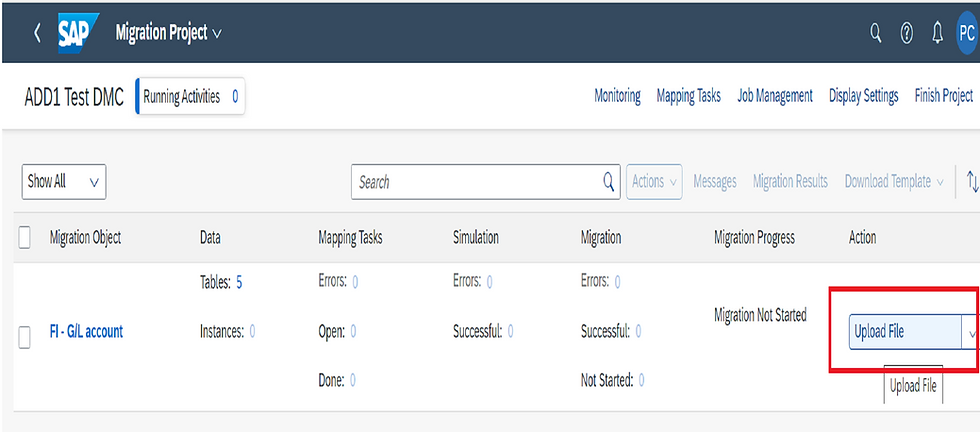
STEP 15: Click on upload to select the Saved Excel file.

STEP 16 : Select your Excel file and click on open.

STEP 17 : Click on "Prepare" to create Staging tables.

STEP 18: Select Prepare Staging Tables and bring the data from source tables of migration Objects. Prepare Staging Tables is setting up temporary database tables where data can be initially loaded before being transferred to the final production tables.

STEP 19: Select "Mapping Tasks" which shows all values to check & confirm your Data before you migrate it into SAP System.

STEP 20: If No Error/ No Changes to be made, Select all Mapping values and Confirm.

STEP 21: Click on OK to proceed to next Step.

STEP 22 : Select "Simulate" to run a simulation to check for any errors or issues that might occur during the actual data load.

STEP 23: Click on Start Simulation

STEP 24: Review the simulation results in monitoring screen and If simulation is successful without errors then proceed to click on "Migrate", last Step of Migration Process where Data Actually gets uploaded into System.

STEP 25: Click on "Start Migration" .

Migration Project "Monitoring" is a screen which shows the Progress and status of project.
The below Project progress show 100% Completed.

Check in S/4 system, as you can see below, the G/L Accounts in screen FS00 is successfully created.

Similarly, you can also migrate any master data and transactional data of other SAP Modules.
Thank you for taking the time to read my blog. I appreciate your support and hope you found this content valuable. Stay tuned and follow me for more insightful articles in the future.
Our Upcoming SAP S/4 HANA Finance (FICO) online Batch
Enroll now: https://www.gauravconsulting.com/product-page/sap-s-4-hana-finance-beginners-live-training
For complete video package visit the link below:
#SAPTraining #SAPJobs #SAPConsultant #SAPtraining #SAPEnterpriseStructure #SAPFiori #SAPCommunity #SAPcertification #SAP


trang chủ xx88 được mình chú ý trong lúc đang tìm lại một danh sách địa điểm đã lưu cho chuyến đi trước. Có một nguồn tham khảo mang tên này nên mình tiện tay mở xem thử, hoàn toàn không phải đang chủ động tìm đúng trang. Mình chỉ kiểm tra nhanh phần giới thiệu và vài nội dung bên dưới. Điều mình để ý là hình ảnh và chữ được bố trí khá cân đối, từng khu vực có khoảng cách vừa phải nên tổng thể không bị chật. Chuyển qua vài mục cũng khá đơn giản, xem một vòng là có thể làm quen với cách sắp xếp.
Some articles compel me to slow down because the subject matter is rather sensitive, and content regarding the grief of losing a pet is one such instance. Previously, I had encountered the topic LV88 of reward-based card games—often associated with leisure and passing the time. Placing these two subjects side by side, I realize that each situation calls for a distinct approach. The section discussing how to cherish memories and allow oneself to grieve is written with great restraint, avoiding the trap of offering hollow words of encouragement.
Vừa mở NHÀ CÁI TK88 lên là thấy giao diện kiểu đồng bộ thật, bấm qua lại không bị lệch nhịp hay phải đoán xem nút nằm đâu. Nội dung cũng chia thành từng khối rõ ràng nên lướt nhanh vẫn nắm được ý chính, không bị ngợp chữ. Mình thích cái cách họ viết kiểu “ăn khớp” ngay từ đầu, đọc vài dòng là hiểu họ muốn hướng tới trải nghiệm liền mạch chứ không màu mè. Kéo xuống thấy các tiêu đề và box tách bạch, nhìn phát là biết phần nào là nội dung chính, phần nào chỉ là thông tin kèm theo.
Mình thấy website Kuwin này được nhắc đến khi đang đọc một chủ đề trên mạng nên cũng mở vào xem thử để tham khảo. Mình không xem quá kỹ năng từng nội dung, chủ yếu chú ý đến cách họ bố trí giao diện và sắp xếp các chuyên mục.
fly88 tình cờ xuất hiện trước mắt mình khi đang xem một bài chia sẻ kinh nghiệm chuẩn bị cho chuyến bay. Mình chỉ định đọc phần lưu ý về hành lý và thủ tục, nhưng thấy cái tên này được nhắc trong một đoạn liên quan nên tiện tay mở thử. Trang có bố cục khá gọn, phần thông tin chính được chia thành từng khu vực nên đọc lướt không bị rối. Mình kéo xuống xem vài mục rồi quay lại phần đầu, thử chuyển qua một số nội dung khác cũng khá thuận. Không tìm hiểu quá sâu nhưng cách trình bày ban đầu khá dễ theo dõi.