


SAP FICO Global Parameters

Updated: Nov 21, 2025
SAP FICO Global Parameters refer to a set of mandatory parameters that needs to be maintained for a company code like Chart of Account, Fiscal Year Variant, Posting Period Variant and Field Status Variant.
Below parameters need to be maintained for the company code:

Variant Principle - is a three step method in SAP system to assign particular properties to one or more objects.
There are 3 Steps in Variant Principle :
1. Define
2. Determine Values
3. Assign to Company Code
Path: - In IMG Screen >>

Fiscal Year Variant :
Fiscal Year Variant - Here we have to define Companies Financial year for Posting Journal Vouchers and to generate Financial Period End Reports.
Countries Like India Follow APR-MAR (V3), USA & European Countries Follow JAN-DEC (K4), Singapore Follows NOV-OCT Period depending on the Countries Legal Requirement.
Here we also mention the Number of Periods and Number of Special Periods Required,
whether it is Shortened Year,
whether the Fiscal Year Requires Year Shift Alignment or Not.
Maintain Fiscal Year Variant - (T-Code OB29)

Year Shift - Allows you to align the fiscal year with a different calendar year. This is Useful for organizations that have fiscal years that do not match the standard calendar year.

Shortened Fiscal Year - This option allows you to define a fiscal year with fewer posting periods than the standard 12-month calendar year. This Can Happen due to Company Restructuring, New Implementation, or Regulatory Requirements. To create Shortened year, it must always be a Year Dependent.
For Example, if your fiscal year starts in April here you can set a Year Shift of -3 months. This means that when you start posting transactions in April (according to your fiscal year), they will align with the first quarter of the calendar year.
Year Dependent & Year Independent
Year Dependent - With a year-dependent fiscal year variant, you can define a different fiscal year structure for each calendar year. This means that the fiscal year variant can change from one calendar year to another. If Every Year is different (either the number of Posting periods or Days in period).
Like:
Year | Period | JAN | FEB | MAR | APR |
2020 | 10 | 31 | 29 | 31 | 30 |
2021 | 11 | 31 | 29 | 31 | 30 |
2022 | 10 | 31 | 28 | 31 | 30 |
Year Independent - Fiscal Year Variant is a type of fiscal year variant configuration that remains constant across all calendar years. This maintains the same fiscal year structure regardless of the calendar year. Every Year have the Same Number of Period and Same number of Days.
Like:
Year | Period | JAN | FEB | MAR | APR |
2020 | 10 | 31 | 28 | 31 | 30 |
2021 | 10 | 31 | 28 | 31 | 30 |
2022 | 10 | 31 | 28 | 31 | 30 |
Assign Company Code to Fiscal Year Variant. (T-Code OB37)

Posting Period Variant:
Posting Period Variant - controls and defines the posting periods that are open for financial transactions within a specific fiscal year variant. This Variant defines the periods during which financial transactions can be posted. Here we can control which periods are Open and Close for Postings.
Different company codes within the same SAP instance can have different Posting Period Variants, allowing flexibility in managing multiple entities with different financial processes.
Define Variant for Open Posting Period (T-Code OBBO)

Assign Posting Period Variant to Company Code (T-Code OBBP)

Open & Close Posting Periods for your Company Code - (T-Code OB52)
There are Normally 3 Period Intervals in posting Period Variant -
Normal Period -(Period-1)
Special Period -(Period-2)
Controlling Area Period -(Period-3)
This can also be linked to user authorization roles. This means that only authorized users can post transactions in open periods, preventing unauthorized.

Special Periods - This Periods are kept for making Year-End Adjustments which are not part of the regular posting period for example if your Current F.Y is 2023-24 you can maintain Special Periods for Previous Year 2022-23 related special Adjustments like corrections related to Tax Authorities, Management etc.
Account Type - is classification that categorizes financial accounts based on their nature and purpose of accounting for posting.
Like :
'+' = Main gate (This must be Open in order to post Transactions)
'A' = Assets
'D' = Customer
'K' = Vendor
'M'= Materials
'S' = Normal General Ledger
Field Status Variant:
Field Status Variant - this controls the field status of various fields in financial documents. It determines which fields are Hidden/Suppress , Display, Required, Optional during the entry of financial transactions, such as creating invoices, posting journal entries, or processing accounts payable and accounts receivable transactions.

It is always Recommended to Copy all Field Status Groups from available Standard Field Status Variant of Company Code 1710 and Alter or Add according to client's requirement instead of Creating from Scratch.
Define Field Status Variant (T-Code OBC4) - (Field Status Variant is 4-Digit Alphanumeric Code)

Field Status Group - is a grouping of fields that are assigned a specific field status within a Field Status Variant. Each field within a document is assigned to a particular field status group. The field status of a group determines whether the field is Hidden, Displayed, required, or optional field on the document entry screen.

Here we Maintain Fields for its behavior at the time of Posting , whether the Fields to be Hidden, Required or Optional.
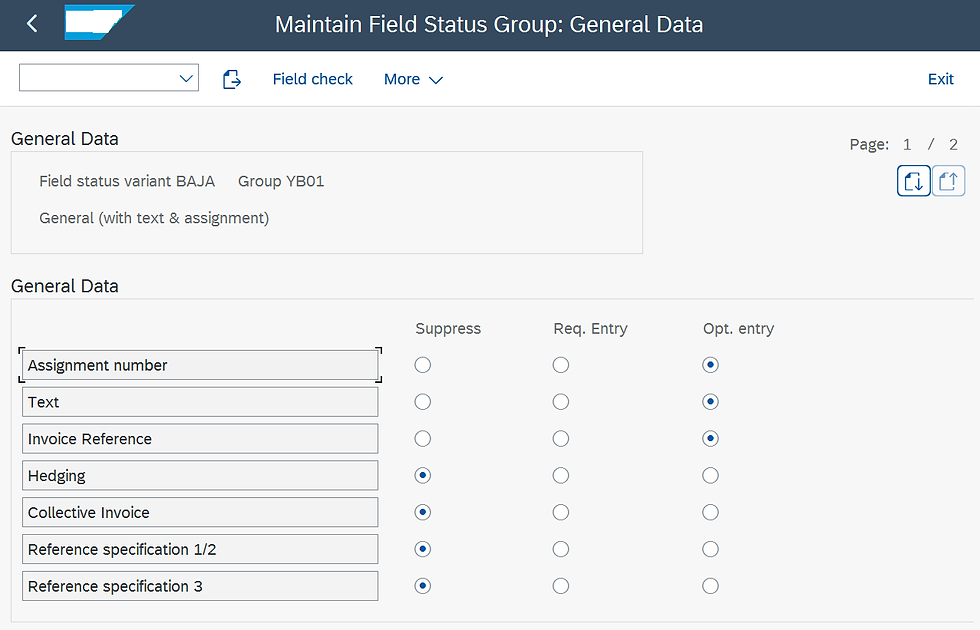
Assign Company Code to Field Status Variant (T-Code OBC5) - It is recommended to have Separate Field Status Variant for each company Code so that any changes in one Variant wouldn't affect the other Company Codes.

Chart of Account
Chart of Account - (CoA) is a structured list of all the general ledger accounts used by a company Codes. It provides a structured and systematic way to categorize and classify various financial transactions and events. This serves as the foundation for the entire financial accounting process within SAP.
Path: To Chart of Account -

Edit Chart of Account List- (OB13) *
(CoA is 4-Digit Alphanumeric Code)
length of G/L Account Number-Max 10 Digit Alphanumeric Code
"✔" Block Check Box- is to Block CoA not to use, if no longer needed.


Assign Company Code to Chart of Account (T-Code OB62)

There are basically 3 Charts of Account:
1. Operational CoA (Mandatory)- is a specific Chart of Accounts that is primarily designed and used for operational purposes within a particular company code. Focuses on capturing detailed transactions and financial data for day-to-day operational activities. It must be assigned to every Company Code in order to carry out Postings.
Like:
Company Code | Chart of Account |
AB01 | CoA1 |
AB02 | CoA2 |
AB03 | CoA3 |
2. Group CoA (Optional) - consolidated version of the individual operational Chart of Accounts used by different company codes within an organization. It serves as a way to standardize and streamline financial reporting and analysis across multiple entities while still accommodating their unique operational accounting needs.
Like:
Company Code | Chart of Account | Group Chart of Account |
AB01 | CoA1 | CoA4 |
AB02 | CoA2 | CoA4 |
AB03 | CoA3 | CoA4 |
3. Country CoA (Optional /Alt.CoA) - It is a specialized type of Chart of Accounts designed to meet the specific legal and regulatory reporting requirements of that country.
This CoA is required when all Company Codes are using same CoA and some Country require Specific CoA for its Legal Reporting.
Like :
Company Code | Chart of Account | Alternate Chart of Account |
AB01 | CoA1 | |
AB02 | CoA1 | CoA2 |
AB03 | CoA1 | |
Thank you for taking the time to read my blog. I appreciate your support and hope you found this content valuable. Stay tuned and follow me for more insightful articles in future.
For complete video package visit the link below
#SAPfiGlobalParameters #SAPFICO #SAPERP #Chartofaccounts #FieldstatusVariant #FiscalYearVariant #PostingPeriodVariant #SAPdocument #SAPblog #SAPcommunity #SAPcertification #SAPjobs #SAPcareer



Nice post with straightforward information. If you enjoy testing your reactions, explore online GD. The game combines rhythmic sounds, precise jumps, and obstacles that require quick decisions. Its controls are easy to understand, but some levels require patience.
tỷ lệ kèo nhà cái mình thấy bạn bè nhắc hoài nên ghé vào xem thử cho biết. Mình không phải dân soi kèo chuyên nghiệp, chủ yếu xem trang trình bày có dễ theo dõi không thôi. Vào cái là thấy bảng kèo để khá rõ, chia cột gọn nên lướt nhanh vẫn so được mấy mức khác nhau mà không bị loạn mắt. Điểm mình thích là phần cập nhật nhìn có vẻ nhanh, kéo xuống là thấy thông tin trận đấu hiện ra liên tục, không phải bấm qua quá nhiều bước. Mấy đoạn giải thích về các loại kèo cũng viết kiểu ngắn gọn, đọc vài dòng là nắm được ý chính. Lướt trên điện thoại…
AO88 hôm bữa mình lướt thử cho biết vì thấy mọi người nhắc hoài, chủ yếu xem giao diện có dễ nhìn không. Vào trang cái là thấy bố cục khá gọn, mấy mục chia rõ theo từng khối nên mình kéo xuống vẫn không bị lạc. Mình thích nhất là phần hỏi-đáp cho người mới, kiểu đọc lướt vài câu là nắm được mấy thứ cơ bản, họ cũng ghi thẳng điều kiện 18+ nên khỏi phải đoán mò. Chữ không bị dày đặc, các ô thông tin đặt vừa mắt nên nhìn phát hiểu luôn. Nói chung trải nghiệm kiểu “vào xem thử” mà thấy dễ chịu, nhất là cái khu FAQ tách câu hỏi và câu trả…
SX88 dạo này thấy mọi người nhắc hoài nên mình cũng bấm vào xem thử cho biết, kiểu lướt giao diện với cách họ viết nội dung thôi. Vừa vào đã thấy họ nói khá thẳng về chuyện minh bạch và có nhắc hệ thống kỹ thuật được nâng cấp để hạn chế gian lận, đọc qua cũng yên tâm hơn chút. Mình không đăng ký hay thử nạp rút gì, chỉ xem cách họ sắp xếp thông tin. Trang nhìn sạch sẽ, chữ dễ đọc, không bị nhồi nhét quá nhiều thứ một lúc nên kéo xuống khá nhẹ đầu. Mấy đoạn quan trọng được tách thành từng khối rõ ràng, tiêu đề “tiêu chuẩn hoạt động” đặt nổi…
kết quả bóng đá mình lướt thấy mấy ông bạn hay gửi nên tò mò vào xem thử, kiểu xem nhanh chứ không phải ngồi canh từng phút. Vừa mở ra là thấy phần livescore chạy liên tục, có đổi tỷ số hay thẻ phạt gì là nó nhảy ngay, mình không phải bấm tải lại hoài. Mình cũng để ý trang load khá nhanh, kéo lên kéo xuống không bị giật, dùng trên điện thoại cũng ổn. Nói chung giao diện nhìn đơn giản, chữ dễ đọc, mấy khung thông tin chia theo tiêu đề rõ nên không bị ngợp. Ấn tượng nhất là mấy box livescore và tỷ số được đặt ngay đầu trang, nhìn phát là biết…