


Purchase Requisition in SAP S/4HANA [SAP MM]

What Is a Purchase Requisition in SAP S/4HANA [SAP MM] ?
A Purchase Requisition in SAP S/4HANA is an internal document created to request the purchase of materials or services. It is not sent to a vendor and does not create any financial liability.
It is a formal request raised within the organization, asking the purchasing team to procure something.
For example:
A production team needs raw material
An IT team needs laptops
A maintenance team needs external services
It is Basically determination of Requirement – what is required, [raw materials or services], for that we create PR in system.
![Purchase Requisition in SAP S/4HANA [SAP MM]](https://static.wixstatic.com/media/94eda5_e848bb39b2c5484996a3eb389f315bcf~mv2.png/v1/fill/w_980,h_653,al_c,q_90,usm_0.66_1.00_0.01,enc_avif,quality_auto/94eda5_e848bb39b2c5484996a3eb389f315bcf~mv2.png)
Why Do We Need a Purchase Requisition?
Many people think: Why can’t we directly create a Purchase Order in SAP system ?
The answer is control and governance.
A PR helps the organization:
Validate actual business need
Ensure budget availability
Follow approval and compliance rules
Avoid unauthorized or maverick buying
In short, it ensures that money is spent only after proper justification and approval.
Who Creates a Purchase Requisition?
Unlike Purchase Orders, which are usually created by the procurement team, Purchase Requisitions can be created by multiple sources:
End users from business departments
Automatically through MRP runs
From Production Orders or Maintenance Orders
From Project Systems (WBS-based requirements)
This flexibility makes PRs a central object connecting planning, operations, and procurement.
How Is a Purchase Requisition Created in S/4HANA?
In SAP S/4HANA, PRs can be created in two main ways:
1. Manual Creation
Classic SAP GUI transaction: ME51N
SAP Fiori App: Create Purchase Requisition
Fiori apps make the process much simpler and user-friendly, especially for non-SAP users.
2. Automatic Creation
Via MRP based on stock shortages
From production, maintenance, or project demands
In real projects, most PRs are actually created automatically rather than manually.
Types of Purchase Requisitions :-
Depending on the business scenario, PRs can be of different types:
Stock PR – Materials procured into inventory
Consumption PR – Materials directly consumed (Cost Center, Internal Order, WBS)
Service PR – External services like consulting, maintenance, manpower
Subcontracting PR – When materials are sent to vendors for processing
Each type drives different follow-up processes in procurement and finance.
Approval Process – The Real Power of PRs
Before PR is converted to PO it needs to be Approved by the senior management to ensure whether Requirement is Genuine and appropriate. One of the biggest advantages of Purchase Requisitions in S/4HANA is the approval workflow.
Approvals can be configured based on:
Value of the PR
Material group
Plant or company code
Cost center or project
With SAP Fiori, approvals are:
Role-based
Mobile-friendly
Fully auditable
This makes the PR approval process faster and more transparent compared to older ECC-style release strategies.
Purchase Requisition vs Purchase Order – Not the Same Thing
This is a very common confusion, especially for beginners.
Purchase Requisition | Purchase Order |
Internal document | External legal document |
No vendor involved | Vendor is mandatory |
Requests approval | Confirms purchase |
No financial commitment | Creates liability |
A PR only requests procurement. A PO actually commits the organization to spend money.
How PR Fits into the End-to-End P2P Process
In a typical Procure-to-Pay (P2P) cycle, the flow looks like this:
Purchase Requisition → Purchase Order → Goods Receipt → Invoice Receipt → Payment
In SAP S/4HANA, the Purchase Requisition is the backbone of procurement. So if the PR is wrong or poorly created, the entire downstream process suffers. If you want procurement to run smoothly in S/4HANA, you must get the Purchase Requisition process right.
How to create Purchase Requisition in SAP S/4HANA [GUI]
PATH: SAP EASY ACCESS --> LOGISTICS --> PURCHASING --> PURCHASE REQUISITION T CODE: [ME51N]
![Path to create purchase requistion [PR] in SAP S/4HANA](https://static.wixstatic.com/media/94eda5_dda5d817cf314a50af7b2d02fc743a1b~mv2.png/v1/fill/w_896,h_548,al_c,q_90,enc_avif,quality_auto/94eda5_dda5d817cf314a50af7b2d02fc743a1b~mv2.png)
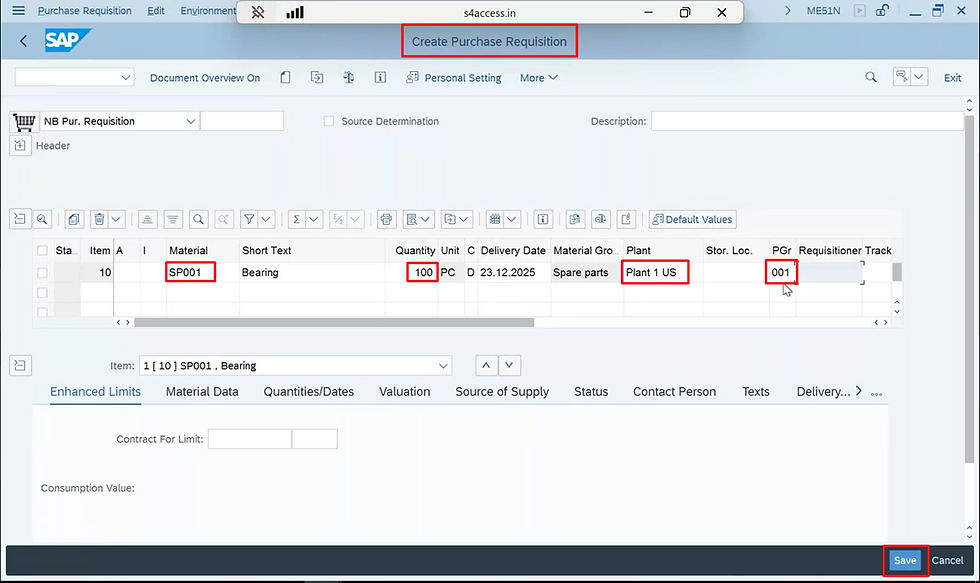
Steps:
Enter transaction code ME51N
Select PR document type (e.g. NB) [standard by default]
Enter:
Material which is required to be purchased
Quantity required and delivery date
Plant and storage location where materials are required
Account assignment (if consumption-based)
Enter purchasing group [Team responsible for purchasing]
Save the document → PR number is generated


![Difference Between SAP ECC MM and SAP S/4HANA Procurement [SAP MM ECC v/s S/4HANA]](https://static.wixstatic.com/media/94eda5_c216c11776674904b6c3504ffe88b7cf~mv2.png/v1/fill/w_980,h_653,al_c,q_90,usm_0.66_1.00_0.01,enc_avif,quality_auto/94eda5_c216c11776674904b6c3504ffe88b7cf~mv2.png)
![What Is SAP S/4HANA Procurement? A Beginner’s Overview [SAP MM]](https://static.wixstatic.com/media/94eda5_130121e7a1d34c35851ecf5e824c7228~mv2.png/v1/fill/w_980,h_653,al_c,q_90,usm_0.66_1.00_0.01,enc_avif,quality_auto/94eda5_130121e7a1d34c35851ecf5e824c7228~mv2.png)


Me gustó la claridad con la que desarrollaste este tema. Todo está bien organizado y la lectura resulta muy cómoda de principio a fin. También acostumbro consultar Loteria Nacional, por lo que siempre es interesante descubrir contenidos relacionados y bien explicados.
The way you presented complex information so simply is remarkable. I admire your ability to convey such detailed information in an accessible way. merge fellas
Finding a good online identity is harder than it sounds. This name generator helped me discover several names that were both memorable and easy to use across different platforms.
After trying several browser driving games, eggy car free stood out because the gameplay is easy to learn but difficult to master. Small improvements make a noticeable difference in distance traveled.
A bad PR decision ruins the whole drift hunters the other day and I got completely hooked on the music mixing aspect. to clear our heads.