


New Cash Account Type for Bank G/L's in SAP S/4HANA
- ADHARSH K S

- Apr 23
- 3 min read
One of the practical improvements introduced in SAP S/4HANA 2020 is the new approach to managing bank accounts through Bank Reconciliation Accounts. This enhancement helps organizations reduce the number of G/L accounts, simplify bank configuration, improve payment processing, and strengthen cash visibility.
In older SAP systems, each house bank account often required its own dedicated set of G/L accounts. As banking structures grew, so did the chart of accounts. SAP addressed this challenge by introducing a smarter model using the Cash Account type.
What changed in S/4HANA 2020?
SAP introduced a new G/L Account Type: "Cash Account". Within this type, different subtypes can be used depending on business purpose.
Key G/L Account Subtype
Subtype | Meaning | Purpose |
|---|---|---|
B | Bank Reconciliation Account | Main account holding confirmed balances |
S | Bank Sub account | Clearing account for payments in transit |
P | Petty Cash | Used for cash journal scenarios |
This allows one main bank reconciliation account to be linked with multiple house bank accounts. Instead of creating separate G/L accounts for every new bank account, companies can now reuse the same reconciliation structure. For example,
Old Model
3 Banks × 3 Accounts each = Total 9 G/L Accounts
New Model
3 Banks × Shared Reconciliation Setup = Only 3 G/L Accounts
How the process works in SAP?
To understand the concept better, let's consider this real-world banking structure.
G/L Account | Description | Purpose |
500030 | Main Bank G/L | Holds actual bank balance |
500040 | Outgoing Bank G/L | Used for Vendor payments |
500050 | Incoming Bank G/L | Used for Customer Receipts |
Customer Incoming Payment
When a customer payment is posted but not yet fully confirmed by the bank:
Debit: Incoming Bank G/L (500050)
Credit: Customer Account
Once the bank statement is received and cleared:
Debit: Main Bank G/L (500030)
Credit: Incoming Bank G/L (500050)
Vendor Outgoing Payment
When a payment run is executed for a vendor:
Debit: Vendor Account
Credit: Outgoing Bank G/L (500040)
Once the payment is confirmed by the bank:
Debit: Outgoing Bank G/L (500040)
Credit: Main Bank G/L (500030)
How to Setup in SAP S/4HANA?
STEP 1: Create Main Bank Account as Bank Reconciliation Account
To Create G/L account with G/L Account Type as Cash Account and Subtype as B (Bank Reconciliation Account) in T. Code FS00 and this becomes the primary account for actual balances.

STEP 2: Create Clearing Bank Accounts as SubAccounts
Create another Bank G/L Account with Cash Account & Subtype with S (Bank Subaccount) then assign it to the main reconciliation account
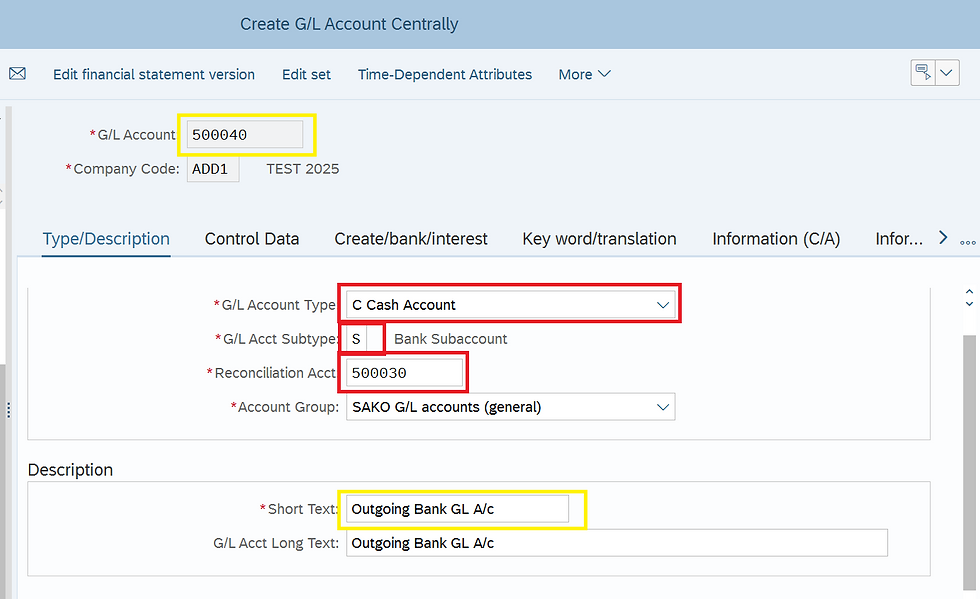
Ensure to tick the Open Item Management check box
These accounts are used during Outgoing or Incoming payments until settlement.

STEP 3: Assign the Main Bank G/L in House Bank

STEP 4: Maintain Bank Clearing G/L under Bank Determination
Go to FBZP > Bank Determination > Bank Accounts (Enhanced)

You can also check under FBZP > Bank Determination > Bank Accounts the Bank Subaccount will be greyed out.

STEP 4: Execute Payments
During Manual payment posting, system checks for House Bank and Bank Account ID as required field.
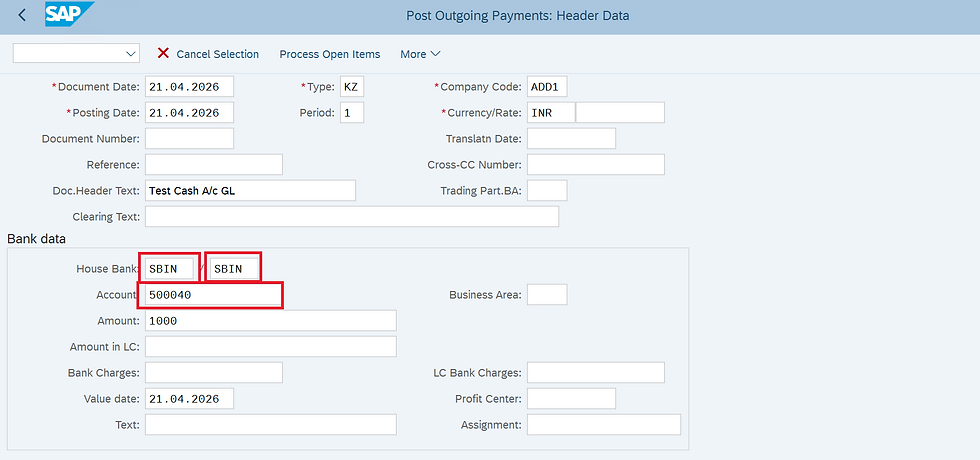
While with Automatic Payment Program (APP) run system uses the linked clearing and reconciliation accounts automatically which is configured in Manual bank Statement.
Bank Reconciliation Accounts may look like a small configuration change, but they solve a major operational problem: too many G/L accounts for too many bank accounts.


Really enjoyed this clear and friendly blog. During a game design discussion, people were talking about websites that make it easy to discover fun games. One participant mentioned PlayVio.io. The website provides free online games across action, puzzle, racing, sports, and multiplayer categories. It was well received because players can quickly explore different genres and start playing right away.
Excelente explicación sobre Bank Reconciliation Accounts en SAP S/4HANA. Simplificar la gestión bancaria mejora la eficiencia y el control financiero. También sigo recursos como loteria nacional para mantenerme informado diariamente. ¡Gracias por compartir un contenido tan útil y bien estructurado!
This streamlined Cash Account subtype setup in S/4HANA drastically cuts redundant bank GL accounts, and cross-checking balances via wirefillchart makes tracking transit payments even simpler for FICO consultants.
This article does a great job explaining how Bank Reconciliation Accounts in SAP S/4HANA help simplify G/L account management and improve cash visibility. After reading informative posts like this, I often unwind with Slope Rider which is a fast-paced game where I navigate a ball down steep slopes while avoiding obstacles and aiming for the longest run possible.
Un altro punto di forza è la discussione sui quadri normativi e sulle difficoltà che incontrano 1w italy nel tenere il passo con lo sviluppo tecnologico. Sebbene leggi come il GDPR abbiano stabilito standard importanti, l'applicazione e la coerenza a livello globale rimangono problematiche a causa della natura senza confini di Internet. Ciò crea delle lacune che possono essere sfruttate, soprattutto nei settori digitali in rapida evoluzione, dove l'interazione con gli utenti è costante e fortemente basata sui dati.