


SAP GUI vs SAP Fiori: Key Differences, Features and Comparison

SAP users often come across two different interfaces when working with SAP systems: SAP GUI and SAP Fiori.
Both can be used to access SAP business processes, but they provide very different user experiences. SAP GUI is the traditional interface used to access many SAP transactions and functions, while SAP Fiori provides a modern, role-based user experience for SAP applications.
Understanding the difference between SAP GUI and SAP Fiori is useful for SAP beginners, consultants, functional users, and organizations moving toward SAP S/4HANA.
In this blog, we will look at what SAP GUI and SAP Fiori are, how they work, their key differences, advantages, limitations, and when each interface is commonly used.
What is SAP GUI?
SAP GUI provides a client-based interface through which users connect to an SAP system and work with transaction codes, menus, screens, tabs, fields, and other SAP functions.
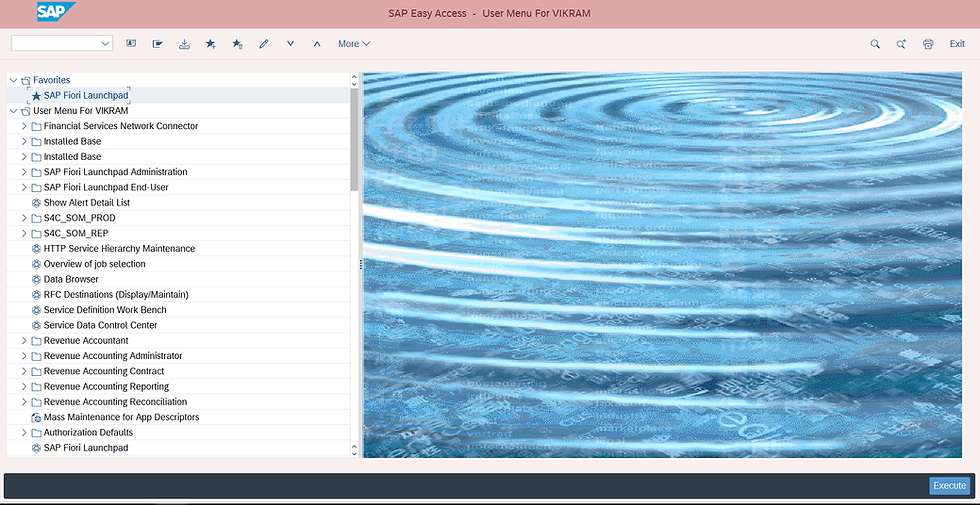
For example:
VA01 – Create Sales Order
VA02 – Change Sales Order
VA03 – Display Sales Order
VL01N – Create Outbound Delivery
VF01 – Create Billing Document
MM01 – Create Material
SAP GUI provides access to a wide range of SAP functions and is still widely used, particularly for configuration, administration, and processes that may not have an equivalent Fiori application.
How SAP GUI works
SAP GUI provides a client-based interface through which users connect to an SAP system and work with transactions, menus, screens, fields, and other SAP functions. The user can navigate through menus, transaction codes, screens, tabs, fields, and other SAP functions.
For consultants, SAP GUI is especially important because many configuration activities are performed through IMG transactions and configuration screens.
What is SAP Fiori?
SAP Fiori is SAP's modern user experience that provides role-based applications designed around specific business tasks and user responsibilities.
Instead of relying primarily on transaction codes, users can access relevant applications through the SAP Fiori Launchpad, which provides a central entry point to Fiori apps.

Users see applications based on their business roles and responsibilities.
For example, a sales user may have access to applications for:
Managing sales orders
Monitoring customer orders
Checking sales documents
Monitoring deliveries
Reviewing billing information
A finance user may see a different set of applications related to accounting, payments, reporting, and financial operations.
SAP Fiori is particularly important in SAP S/4HANA, where SAP provides many business processes through Fiori applications.
SAP GUI vs SAP Fiori: Key Difference
The biggest difference is the user experience and method of accessing SAP functionality.
SAP GUI provides a traditional SAP interface where users commonly navigate through transaction codes and structured screens.
SAP Fiori provides a modern, role-based interface where users access applications from the Fiori Launchpad.
Feature | SAP GUI | SAP Fiori |
Interface | Traditional SAP interface | Modern SAP user experience |
Navigation | Transaction codes, menus and screens | Apps, spaces and pages |
User Experience | Transaction-oriented | Role- and task-oriented |
Access | SAP GUI client | Commonly accessed through a web browser |
Transaction Codes | Frequently used | Usually not required for end users |
Fiori Launchpad | Not applicable | Central entry point for Fiori applications |
Device Support | Primarily desktop-oriented | Many applications support different screen sizes |
Personalization | More limited | Role-based and more flexible |
Learning Curve | Can be complex for beginners | Often simpler for task-based users |
SAP S/4HANA | Still widely used | Important part of the modern SAP user experience |
SAP GUI vs SAP Fiori: Transaction Codes
Transaction codes are an important part of traditional SAP usage.
For example, an SAP SD consultant may commonly work with:
VA01 – Create Sales Order
VA02 – Change Sales Order
VA03 – Display Sales Order
VL01N – Create Delivery
VL02N – Change Delivery
VF01 – Create Billing Document
In Fiori, the same or a related business process may be available through a dedicated application, depending on the SAP product, version, and available Fiori apps.
Instead of remembering a transaction code, a user can open the relevant application from the Fiori Launchpad.
This does not mean transaction codes have disappeared. SAP GUI remains important for many SAP activities, and transaction-based processing continues to be used in many environments.
SAP Fiori Launchpad
The SAP Fiori Launchpad acts as a central entry point for Fiori applications.
The applications and launchpad content available to users are determined by their assigned roles, authorizations, and system configuration.
For example, an organization might provide different launchpad content for:
Sales users
Procurement users
Finance users
Warehouse users
Production users
Managers
The launchpad can organize applications using spaces and pages, depending on the SAP configuration and version.
This role-based approach helps users see the applications that are relevant to their responsibilities.
Advantages of SAP GUI
1. Extensive SAP functionality
SAP GUI provides access to a large range of SAP transactions and functions.
2. Useful for consultants
Functional and technical consultants frequently use SAP GUI for configuration, testing, troubleshooting, and system administration.
3. Transaction-based navigation
Experienced users can quickly access functions using transaction codes.
4. Detailed screens
SAP GUI often provides detailed information and controls within individual transactions.
Advantages of SAP Fiori
1. Modern user experience
Fiori provides a cleaner and more modern interface compared with the traditional SAP GUI experience.
2. Role-based applications
Users can receive applications based on their job responsibilities.
3. Easier task navigation
Users can open applications directly instead of remembering a large number of transaction codes.
4. Support for different screen sizes
Many Fiori applications use responsive design principles and can provide a suitable experience across different screen sizes.
5. Personalized experience
Fiori allows organizations and users to organize applications according to business roles and requirements.
Limitations of SAP GUI
Although SAP GUI remains powerful, it can present challenges for new users.
The interface can appear complex to beginners.
Users may need knowledge of transaction codes.
Navigation can be less intuitive for occasional users.
The traditional SAP GUI experience is primarily designed for desktop-based work.
The experience can vary considerably between transactions.
Limitations of SAP Fiori
Fiori also has some considerations.
Not every SAP transaction has a direct Fiori equivalent.
The availability of applications depends on the SAP product and version.
Proper role and authorization configuration is required.
Implementing and maintaining the Fiori experience may require appropriate system configuration, roles, authorizations, and launchpad administration.
Experienced SAP GUI users may need time to adapt to the new navigation model.
Can SAP GUI and SAP Fiori Be Used Together?
SAP GUI and SAP Fiori are not necessarily alternatives where an organization must choose only one. In many SAP environments, both interfaces are used depending on the business requirement and the user's role.
Business users may use Fiori applications for common day-to-day tasks, while consultants, administrators, and experienced users may continue to use SAP GUI for configuration, troubleshooting, detailed transactions, and functions that are not available through an equivalent Fiori application.
This is particularly relevant in SAP S/4HANA environments, where Fiori is an important part of the user experience while SAP GUI continues to provide access to many traditional SAP transactions.
SAP GUI vs SAP Fiori: Simple Example
Consider a sales employee who needs to create a sales order for a customer.
The user may:
1. Log into the SAP system.
2. Enter a transaction code such as VA01.
3. Select the sales document type.
4. Enter customer and organizational data.
5. Enter material and quantity.
6. Check pricing and availability.
7. Save the sales order.
Using SAP Fiori
The user may:
1. Log into the Fiori Launchpad.
2. Open the relevant sales order application.
3. Enter the required customer and sales information.
4. Add materials and quantities.
5. Review the relevant information.
6. Save the sales order.
The underlying business process can be similar, but the way the user interacts with the system is different.
Conclusion
SAP GUI and SAP Fiori provide different ways of interacting with SAP systems. SAP GUI offers a traditional, transaction-oriented experience and remains important for many SAP transactions, configuration activities, and administrative tasks. SAP Fiori focuses on a modern, role-based and task-oriented user experience through applications available from the Fiori Launchpad.
For SAP S/4HANA users and consultants, understanding both interfaces can be valuable. The choice of interface depends on the business process, available applications, system configuration, and the user's responsibilities.
FAQs
1. Is SAP Fiori the same as SAP GUI?
No. SAP GUI is the traditional SAP user interface, while SAP Fiori is SAP's modern user experience and application approach.
2. Does SAP S/4HANA use SAP GUI?
Yes. SAP GUI continues to be used in SAP S/4HANA environments alongside Fiori, depending on the business process and system configuration.
3. Do I need to learn SAP GUI before learning Fiori?
Not necessarily. However, SAP professionals can benefit from understanding SAP GUI, SAP transactions, and traditional SAP processes while learning Fiori.
4. Is SAP Fiori easier for beginners?
Fiori is designed to simplify the user experience, particularly through role-based applications and task-focused navigation. However, understanding the underlying SAP business process is still important.
5. What is the SAP Fiori Launchpad?
The SAP Fiori Launchpad is a central entry point where users can access applications, search for business content, receive notifications, and navigate to relevant SAP functions.
6. Is SAP Fiori important for an SAP S/4HANA consultant?
Yes. Fiori is an important part of the modern SAP S/4HANA user experience, so consultants should understand Fiori applications, navigation, roles, and basic Fiori concepts.
Learn SAP S/4HANA with Practical Training
If you are planning to build your career in SAP S/4HANA, practical knowledge of both SAP GUI and SAP Fiori can help you understand traditional SAP processes as well as the modern S/4HANA user experience.
Explore SAP S/4HANA video courses, live training, practical training, and certification preparation programs from Gaurav Learning Solutions.
Start learning SAP S/4HANA today and build job-ready practical skills.



Comments